SQL Joins Explained: INNER JOIN, LEFT JOIN and RIGHT JOIN with Examples
Imagine a student trying to answer a simple question: Which online learning resources have students used, and which have never been accessed? The database lists educational resources in one table and recorded study sessions in another. Reading either table alone gives only half the answer. You need a reliable way to match the tables without silently dropping unused resources, inventing missing sessions or counting one resource multiple times by accident.
That is the purpose of a SQL JOIN. This practical tutorial explains INNER JOIN, LEFT JOIN and RIGHT JOIN through one consistent fictional learning-resources database. You will compare actual input rows, execute SQL, inspect every output row, understand where NULL values arise and learn why a four-row table can produce six results. The examples have been executed with SQLite 3.46.1. Readers using older SQLite versions will also learn the compatible LEFT JOIN alternative to RIGHT JOIN.
Unlike a syntax-only guide or a Venn-diagram lesson, we will pay close attention to row preservation, matching keys, output granularity and row multiplication. You will build a miniature four-resource example before moving to a full project of 25 fictional students, eight subjects, 32 learning resources and 150 recorded usage events. No personal student information is used. The source data, SQL creation scripts, verified solutions and printable worksheets are included in the accompanying teaching package.
Tested teaching results: the miniature INNER JOIN returns 5 rows, while the equivalent resource-preserving LEFT JOIN and RIGHT JOIN each return 6. Biology Quiz (Resource 102) has no recorded usage and therefore appears only in the resource-preserving outer-join results. The larger project has 150 usage events, four unused resources and two students without recorded activity.
What is a SQL JOIN?
A JOIN combines rows from two table expressions according to an explicit relationship. The left table appears before the JOIN keyword, the right table appears after it, and the join condition describes which values identify related rows. Each matching pair contributes an output row. The precise kind of join determines what happens when one table contains a row with no counterpart on the other side.
For example, a resource identified by resource_id = 101 may appear once in a Resources table, but three times in a ResourceUsage table if it was accessed on three occasions. A join using resource_id can produce three results for that one resource. The phrase “match two tables” does not mean “choose one right row for each left row.” That misunderstanding is responsible for many incorrect reports.
| Term | Beginner-friendly meaning | Miniature example |
|---|---|---|
| Left input | The table expression before the JOIN keyword | Resources in Resources LEFT JOIN ResourceUsage |
| Right input | The table expression after JOIN | ResourceUsage in that same query |
| Join key | Field used to identify related records | resource_id |
| Matched pair | Two rows satisfying the ON condition | Resource 101 and Usage 1 |
| Unmatched record | A row without a qualifying pair | Resource 102 has no usage |
| Result set | Rows and selected columns returned by the query | The five INNER JOIN results |
LEFT and RIGHT refer only to the positions of the inputs inside a particular SQL expression. They are not fixed properties of a database table, and they do not refer to physical screen placement. Once you reverse the table order, you must reconsider which side you intend to preserve. Visual diagrams should show actual row connections, not just overlapping circles.

Why relational databases separate information
A relational design stores each kind of fact in an appropriate table. Students holds learner codes and study levels. Subjects holds subject names and categories. Resources records resource titles and their assigned subjects. ResourceUsage stores individual access events, linking a student with the resource used, the date, time spent and completion status. Without this separation, every usage event would repeat a learner code, subject name and resource title. That repetition makes edits inconsistent and obscures which fact belongs to which entity.
Each table has a primary key: student_id, subject_id, resource_id or usage_id. A primary key uniquely identifies a row. A foreign key points from a related table to a parent table, for example ResourceUsage.resource_id referring to Resources.resource_id. Foreign-key constraints can prevent nonexistent resource identifiers from entering the usage table when they are enabled. They do not automatically write a JOIN for you: a query still needs to specify which relationship it wishes to use.
Relationship diagram: Students 1 → many ResourceUsage many → 1 Resources many → 1 Subjects. Each usage belongs to one student and one resource; each resource belongs to one subject. A student can have multiple usage rows, a resource can have multiple usage rows, and a subject can contain multiple resources.
A one-to-one relationship means that a key appears at most once on each side of the intended relationship. A one-to-many relationship, like Resources to ResourceUsage, permits many child rows. Many-to-many relationships are normally represented through an intermediate table: Students and Resources can be related through several ResourceUsage events. Such a bridging table can contain additional facts, such as access_date and completed, rather than merely linking two identifiers.
Build the miniature database before writing joins
We start with only four subjects, four learning resources, four fictional learner codes and five usage records. The deliberately small size makes every output auditable by eye. The example includes two subjects with multiple resources, one resource with no usage, and Physics with no resources. All five usage events reference existing students and resources; unmatched outer-join results do not require broken foreign keys.
| subject_id | subject_name |
|---|---|
| 1 | Biology |
| 2 | Chemistry |
| 3 | Mathematics |
| 4 | Physics |
| resource_id | subject_id | resource_title |
|---|---|---|
| 101 | 1 | Biology Notes |
| 102 | 1 | Biology Quiz |
| 201 | 2 | Chemistry Video |
| 301 | 3 | Mathematics Worksheet |
| usage_id | student_code | resource_id | minutes | completed |
|---|---|---|---|---|
| 1 | S01 | 101 | 25 | 1 |
| 2 | S02 | 101 | 40 | 0 |
| 3 | S01 | 201 | 35 | 1 |
| 4 | S03 | 201 | 55 | 0 |
| 5 | S02 | 301 | 20 | 1 |
A fourth learner, S04, appears in Students but has no usage record. Resource 101 appears in Usage 1 and Usage 2. Resource 102 appears nowhere in ResourceUsage, so it is unused. Resource 201 appears twice, and Resource 301 appears once. Physics has no resources. These facts will explain the different joins without changing the underlying tables between demonstrations.
Run the database with SQLite
You can use DB Browser for SQLite or Python’s built-in sqlite3 module. Download the miniature .db file for immediate practice, or execute its accompanying setup script on a new empty database. Confirm that your environment supports native RIGHT JOIN by running SELECT sqlite_version();. Our tests used SQLite 3.46.1; SQLite added RIGHT and FULL OUTER JOIN in 3.39.0. Earlier versions need an equivalent rewriting for the examples later in this lesson. SQLite’s official release notes document the change.
SELECT sqlite_version();
PRAGMA foreign_keys = ON;
PRAGMA foreign_key_check;
The following shortened setup shows the exact table relationships used by the miniature and full databases. The full downloadable SQL scripts contain all CREATE TABLE statements, constraints, indexes and INSERT values. Do not create an orphaned usage row merely to “demonstrate” NULL in a LEFT JOIN: the missing match is created by the absence of a usage event for an otherwise valid resource.
CREATE TABLE Subjects (
  subject_id INTEGER PRIMARY KEY,
  subject_name TEXT NOT NULL UNIQUE,
  subject_category TEXT NOT NULL
);
CREATE TABLE Students (
  student_id INTEGER PRIMARY KEY,
  student_code TEXT NOT NULL UNIQUE,
  study_level TEXT NOT NULL,
  region TEXT NOT NULL
);
CREATE TABLE Resources (
  resource_id INTEGER PRIMARY KEY,
  subject_id INTEGER NOT NULL REFERENCES Subjects(subject_id),
  resource_title TEXT NOT NULL,
  resource_type TEXT NOT NULL,
  difficulty_level TEXT NOT NULL,
  estimated_minutes INTEGER NOT NULL
);
CREATE TABLE ResourceUsage (
  usage_id INTEGER PRIMARY KEY,
  student_id INTEGER NOT NULL REFERENCES Students(student_id),
  resource_id INTEGER NOT NULL REFERENCES Resources(resource_id),
  access_date TEXT NOT NULL,
  minutes_spent INTEGER NOT NULL,
  completed INTEGER NOT NULL CHECK(completed IN(0,1))
);
For a short reproducible sample, insert the four subjects, four resources and four students first, then the five usage rows, with the primary and foreign keys shown above. The packaged setup file performs these inserts deterministically. Date strings use a consistent ISO-style YYYY-MM-DD representation. The data describe synthetic learning actions, not records about actual students or schools.

Understanding matching rows, one pair at a time
Imagine drawing a line from each Resources.resource_id to every equal ResourceUsage.resource_id. The result is five match lines: 101 → Usage 1, 101 → Usage 2, 201 → Usage 3, 201 → Usage 4, and 301 → Usage 5. Resource 102 has no line. You can reproduce that drawing with the PDF diagrams and compare the lines to query output. Importantly, matching depends on keys, not on resource titles sharing words.
| Resource | Matching usage events | What the relationship tells us |
|---|---|---|
| 101 — Biology Notes | 1 and 2 | Two legitimate events produce two pairs |
| 102 — Biology Quiz | none | Unused resource must be kept by an outer join |
| 201 — Chemistry Video | 3 and 4 | Two distinct usage rows |
| 301 — Mathematics Worksheet | 5 | One matching usage row |
This is the key distinction between source-row duplication and join multiplicity. A resource can be correctly stored once yet appear multiple times after a join because it is related to multiple usage events. The number of result rows depends on how many matching pairs exist and, for outer joins, how many unmatched preserved rows require an additional NULL-extended result.

INNER JOIN explained: show matching pairs only
An INNER JOIN outputs each pair of rows for which the ON condition is true. For our mini database, each usage event references a real resource, so all five usage rows can be matched. Resource 102 has no usage event and contributes no INNER JOIN result. This is appropriate when the analysis asks which resources were actually accessed, but not when the objective is to audit every resource including those never used.
SELECT
  r.resource_id,
  r.resource_title,
  u.usage_id
FROM Resources AS r
INNER JOIN ResourceUsage AS u
  ON r.resource_id = u.resource_id
ORDER BY r.resource_id, u.usage_id;| ResourceID | Resource title | UsageID |
|---|---|---|
| 101 | Biology Notes | 1 |
| 101 | Biology Notes | 2 |
| 201 | Chemistry Video | 3 |
| 201 | Chemistry Video | 4 |
| 301 | Mathematics Worksheet | 5 |
Read the query in order. FROM identifies Resources as the left input and names its alias r. INNER JOIN introduces ResourceUsage with alias u. ON compares the two resource IDs and prevents unrelated row pairings. SELECT chooses three output columns; it does not make records unique. ORDER BY sorts the final result for reproducible classroom comparisons. Without ORDER BY, the database is not required to return a stable presentation order.
Output row 1 is Resource 101 matched to Usage 1. Row 2 is the same resource matched to Usage 2. Rows 3 and 4 reflect both chemistry sessions; row 5 reflects the mathematics session. The Biology Quiz is absent because it cannot form a matching pair. The correct output count is five, not four. An INNER JOIN is useful for combining transactions with known products, enrollment events with courses, or usage records with resource titles.
A common beginner mistake is to join on fields that look similar but do not represent the same key, such as comparing a student ID with a resource ID. A query may still run and produce rows, but those rows have no valid relationship. Before writing SQL, trace the foreign-key arrows in the schema and test a few known matching IDs manually.

LEFT JOIN explained: keep every resource
A LEFT JOIN preserves every row from the left input and combines it with all matching rows on the right. If no match exists, the database adds one row with NULL in the right-side output columns. On our resource-preserving query, Biology Quiz remains visible even though nobody accessed it. Resources that match several usage rows still appear several times; “preserve left” does not mean “return exactly one row per left record.”
SELECT
  r.resource_id,
  r.resource_title,
  u.usage_id
FROM Resources AS r
LEFT JOIN ResourceUsage AS u
  ON r.resource_id = u.resource_id
ORDER BY r.resource_id, u.usage_id;| ResourceID | Resource title | UsageID |
|---|---|---|
| 101 | Biology Notes | 1 |
| 101 | Biology Notes | 2 |
| 102 | Biology Quiz | NULL |
| 201 | Chemistry Video | 3 |
| 201 | Chemistry Video | 4 |
| 301 | Mathematics Worksheet | 5 |
The LEFT JOIN returns six rows: five matched pairs and one unmatched resource. Row 3 tells us that Resource 102 exists, but no qualifying usage record exists. NULL is a special SQL marker indicating that the right-side value is absent from this joined row; it does not assert a zero-minute session, an empty text string or a missing resource description stored elsewhere.
LEFT JOIN is especially valuable for reporting coverage: list all students and their optional activity, all inventory items and their sales, all library titles and their borrowing records, or every subject and its assigned resources. It protects the population being audited. A dashboard that starts from ResourceUsage with an INNER JOIN could never reveal a resource that has never been used, because no usage row exists to match it.
However, resource 101 still appears twice because two separate sessions reference it. If you need one line per resource, aggregate before displaying or after joining. Do not add DISTINCT automatically to hide the second session. DISTINCT may make the table look neat while erasing information about real learner activity.

RIGHT JOIN explained: preserve the right-hand input
A RIGHT JOIN returns all rows from the right input plus every matching row from the left. If there is no left-side match, its columns become NULL in the output. RIGHT JOIN is not a separate data model: it is a way of stating which input must remain visible. A convenient teaching trick is to swap the two tables from the preceding LEFT JOIN, leaving the same relationship condition and selected columns.
SELECT
  r.resource_id,
  r.resource_title,
  u.usage_id
FROM ResourceUsage AS u
RIGHT JOIN Resources AS r
  ON u.resource_id = r.resource_id
ORDER BY r.resource_id, u.usage_id;| ResourceID | Resource title | UsageID |
|---|---|---|
| 101 | Biology Notes | 1 |
| 101 | Biology Notes | 2 |
| 102 | Biology Quiz | NULL |
| 201 | Chemistry Video | 3 |
| 201 | Chemistry Video | 4 |
| 301 | Mathematics Worksheet | 5 |
This RIGHT JOIN preserves Resources because Resources is now on the right. Resource 102 still has no usage, so UsageID is NULL. The executed result has the exact same six logical rows as the previous LEFT JOIN example. A different order of SQL table expressions does not necessarily change the answer when the intended preserved relation, ON predicate and projection are preserved. We used ORDER BY to make output comparison exact.
Native RIGHT and FULL OUTER JOIN were added to SQLite in version 3.39.0. If a classroom computer runs an older engine, rewrite this particular example using Resources LEFT JOIN ResourceUsage. Be careful when swapping tables in complex queries: revisit all ON clauses, projected columns, null tests, filters and aggregates. A blind search-and-replace of the keyword RIGHT with LEFT is not a safe general conversion.
RIGHT JOIN with Subjects: why Physics remains visible
SELECT s.subject_name, r.resource_title
FROM Resources AS r
RIGHT JOIN Subjects AS s
  ON r.subject_id = s.subject_id
ORDER BY s.subject_id, r.resource_id;| Subject | Resource title |
|---|---|
| Biology | Biology Notes |
| Biology | Biology Quiz |
| Chemistry | Chemistry Video |
| Mathematics | Mathematics Worksheet |
| Physics | NULL |
There are five results, not four, because Biology has two resources. Physics contributes a NULL resource title because it has no Resources row. The query answers “show every subject, including subjects with no assigned learning materials.” The equivalent older-SQLite form begins FROM Subjects AS s LEFT JOIN Resources AS r and uses the same subject-to-resource comparison.
INNER vs LEFT vs RIGHT: compare the preserved rows
| Join | Which input is preserved? | Mini result rows | Unmatched 102 appears? | Typical use |
|---|---|---|---|---|
| INNER JOIN | Only pairs satisfying ON | 5 | No | Show actual usage and titles |
| LEFT JOIN | All left rows, with matches | 6 | Yes, with NULL usage | Audit all resources |
| RIGHT JOIN | All right rows, with matches | 6 | Yes, with NULL usage | Preserve right-side resource catalog |
Choose the join from the research question, not from habit. If you want only recorded resource activity, INNER JOIN is natural. If you want every resource, start with Resources and LEFT JOIN usage; or put Resources on the right of an equivalent RIGHT JOIN where the database supports it. A rule to remember: identify the table whose rows must not disappear, then locate it on the preserved side.
A useful visual is a row-by-row match diagram. For INNER JOIN, draw the five arrows connecting 101 to 1 and 2, 201 to 3 and 4, and 301 to 5, with no output for 102. For LEFT JOIN, keep those arrows but add an output row for 102 with NULL usage. For the equivalent RIGHT JOIN, reverse the table positions and preserve the same resource catalog. The downloadable diagram sheet depicts these exact connections and counts.
What happens to NULL values after a join?
NULL signals missing or unknown information under SQL’s semantics; it is not automatically an empty string, zero or a placeholder name. Outer joins introduce NULLs for columns belonging to the input that had no matching row. That is different from a real matching row whose nullable descriptive column happens to be NULL. To identify an unmatched event reliably, test a nonnullable key from the optional side, such as ResourceUsage.usage_id.
Ordinary SQL equality does not match two NULL values, because comparisons involving NULL normally evaluate to UNKNOWN rather than TRUE. The correct predicates are IS NULL and IS NOT NULL. For instance, u.usage_id IS NULL after a resource-preserving LEFT JOIN indicates there is no matching usage row when usage_id is guaranteed nonnull. A WHERE condition looking at a nullable description could misclassify a valid related row whose description was not supplied.
-- Correct: check the right-side nonnullable key.
SELECT r.resource_id, r.resource_title
FROM Resources AS r
LEFT JOIN ResourceUsage AS u
  ON r.resource_id = u.resource_id
WHERE u.usage_id IS NULL
ORDER BY r.resource_id;| ResourceID | Resource title |
|---|---|
| 102 | Biology Quiz |
This query is a form of anti-join: it finds left-side records without matching right-side records. In our miniature dataset it returns one result: Biology Quiz. You can express a similar search with NOT EXISTS, which can be especially readable in more complex applications. Both approaches must use the correct relationship and the correct notion of an absent event.

ON versus WHERE: an important outer-join difference
The ON clause defines which row pairs qualify as matches for a join. The WHERE clause filters the result rows after the join’s matching and outer-row extension have been handled. With INNER JOIN, moving a simple right-table restriction between ON and WHERE often preserves meaning. With a LEFT JOIN, it can change which unmatched resource rows survive. This is not a theoretical nuance: it determines whether a dashboard displays an unused resource.
Example A: filter completed sessions inside ON
SELECT r.resource_id, r.resource_title, u.usage_id
FROM Resources AS r
LEFT JOIN ResourceUsage AS u
  ON r.resource_id = u.resource_id
 AND u.completed = 1
ORDER BY r.resource_id, u.usage_id;| ResourceID | Resource | UsageID |
|---|---|---|
| 101 | Biology Notes | 1 |
| 102 | Biology Quiz | NULL |
| 201 | Chemistry Video | 3 |
| 301 | Mathematics Worksheet | 5 |
The ON condition matches completed sessions only. The incomplete Usage 2 and Usage 4 do not match, but Resources as the left input must still be preserved. Resource 102 has no completed session—or any session—so it appears as a NULL-extended row. The query returns four rows, as verified by SQLite.
Example B: put the completion condition in WHERE
SELECT r.resource_id, r.resource_title, u.usage_id
FROM Resources AS r
LEFT JOIN ResourceUsage AS u
  ON r.resource_id = u.resource_id
WHERE u.completed = 1
ORDER BY r.resource_id, u.usage_id;| ResourceID | Resource | UsageID |
|---|---|---|
| 101 | Biology Notes | 1 |
| 201 | Chemistry Video | 3 |
| 301 | Mathematics Worksheet | 5 |
Here the resource-preserving join is performed first, but WHERE retains only rows whose completion field equals 1. The unmatched Biology Quiz row has NULL completion, which does not satisfy the test. The result has three rows. Moving the same-looking condition changes the output from four to three and silently loses the unused resource from the displayed results.
Decision rule: When you want all resources alongside any completed sessions, put the completion restriction in ON. When you want only rows representing completed sessions, WHERE is appropriate. Test the intended population before adopting either form; ON and WHERE are not interchangeable for outer joins.
Why a JOIN can create more rows than either input
Our Resources table contains four rows and the ResourceUsage table contains five. The LEFT JOIN returns six rows. That is not a failure or an accidental copy of a resource record. It is the correct consequence of a one-to-many relationship: one parent resource can connect to several independent usage observations, and each connection appears separately in the joined output. Understanding cardinality is more important than expecting a fixed row-count formula.
In real datasets, duplicates can have different origins. A truly duplicated usage_id violates a uniqueness rule if allowed into an improperly constrained table. Two distinct usage IDs for the same resource are legitimate repeat activity. A many-to-many join between two nonunique fields may multiply rows across combinations of all their matches. A SELECT list that omits unique identifiers can also make different underlying rows look identical. Use primary keys and row-by-row evidence before deleting anything.
The quick fix SELECT DISTINCT is dangerous when applied without diagnosis. It can suppress a visually repeated resource title while also hiding that there were two independent study sessions. Before using it, ask: “What is one row supposed to represent after this join?” If the answer is one resource, aggregate usage first; if it is one usage event, retain the usage_id.
How to count correctly after LEFT JOIN
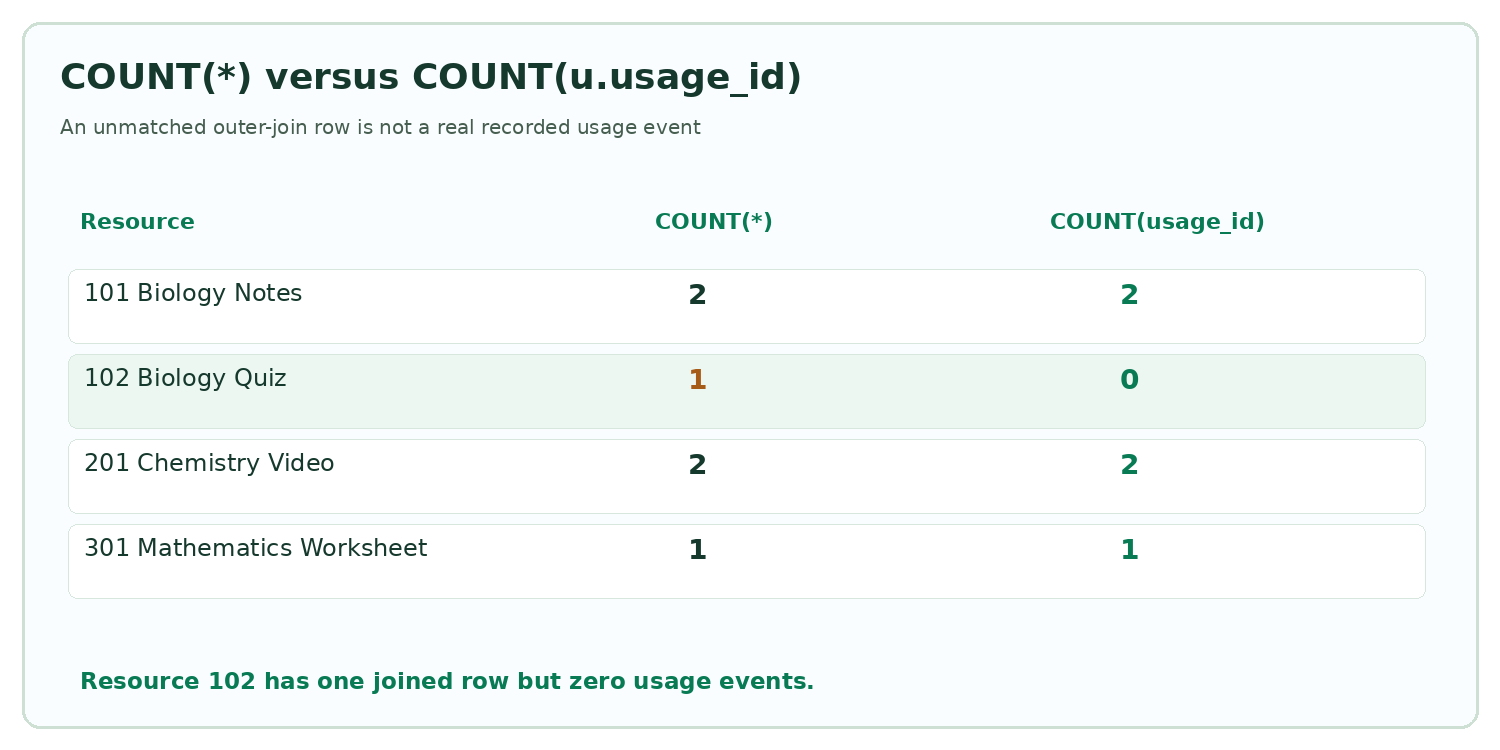
Suppose you want the number of usage events per resource, including resources that have zero events. COUNT(*) counts result rows, including the NULL-extended row for an unused resource. COUNT(u.usage_id) counts non-NULL usage IDs, so it returns zero for an unmatched resource. This distinction is a foundational skill for SQL analytics.
SELECT r.resource_id, r.resource_title,
       COUNT(u.usage_id) AS usage_count,
       COUNT(*) AS joined_rows
FROM Resources AS r
LEFT JOIN ResourceUsage AS u
  ON r.resource_id = u.resource_id
GROUP BY r.resource_id, r.resource_title
ORDER BY r.resource_id;| ResourceID | Resource | COUNT(usage_id) | COUNT(*) |
|---|---|---|---|
| 101 | Biology Notes | 2 | 2 |
| 102 | Biology Quiz | 0 | 1 |
| 201 | Chemistry Video | 2 | 2 |
| 301 | Mathematics Worksheet | 1 | 1 |
For Resource 102, the single outer-join row contains a NULL u.usage_id. COUNT(*) sees one joined row, but COUNT(u.usage_id) sees zero events. The second number answers the actual research question. GROUP BY ensures one output record per resource. It is important to include the unique resource_id in GROUP BY rather than grouping solely on a title that might not be unique.
Join three tables: show who accessed which resource
A real educational report often needs information from three tables. ResourceUsage knows the student ID and resource ID, but it does not store the descriptive learner code or resource title. Join Students to ResourceUsage using student_id, then ResourceUsage to Resources using resource_id. Qualified column names make it clear which table provides each field and prevent ambiguous-column errors.
SELECT s.student_code, r.resource_title, u.minutes_spent
FROM Students AS s
INNER JOIN ResourceUsage AS u
  ON s.student_id = u.student_id
INNER JOIN Resources AS r
  ON r.resource_id = u.resource_id
ORDER BY u.usage_id;| Learner | Resource | Minutes |
|---|---|---|
| S01 | Biology Notes | 25 |
| S02 | Biology Notes | 40 |
| S01 | Chemistry Video | 35 |
| S03 | Chemistry Video | 55 |
| S02 | Mathematics Worksheet | 20 |
There are five rows because all five usage events have valid student and resource keys. Each row describes one usage event enriched with two descriptive fields. Learner S01 appears twice because that learner has two recorded sessions; the repetition is intentional. Learner S04 does not appear because there is no usage event to drive an INNER JOIN result. To list every learner including inactive ones, reverse the analytical starting point and use a suitable LEFT JOIN.
Join four tables: introduce the subject name
Now add Subjects. The full chain is Students → ResourceUsage → Resources → Subjects. You can display the learner code, subject name, resource title and minutes in one result while keeping usage events as the output unit. The presence of four tables does not automatically make the query a four-way many-to-many relationship; the actual schema and key cardinality determine each match.
SELECT s.student_code, sub.subject_name,
       r.resource_title, u.minutes_spent
FROM Students AS s
JOIN ResourceUsage AS u
  ON s.student_id = u.student_id
JOIN Resources AS r
  ON r.resource_id = u.resource_id
JOIN Subjects AS sub
  ON sub.subject_id = r.subject_id
ORDER BY u.usage_id;| Learner | Subject | Resource | Minutes |
|---|---|---|---|
| S01 | Biology | Biology Notes | 25 |
| S02 | Biology | Biology Notes | 40 |
| S01 | Chemistry | Chemistry Video | 35 |
| S03 | Chemistry | Chemistry Video | 55 |
| S02 | Mathematics | Mathematics Worksheet | 20 |
This five-row result lets a student calculate study minutes by subject or identify which fictional learner accessed each learning resource. When expanding to the full 150-event database, check that each usage ID appears exactly once in an INNER JOIN through valid one-to-many parent relationships. If joining an extra nonunique table increases the row count unexpectedly, inspect its keys before computing totals.
GROUP BY and HAVING for multi-table questions
GROUP BY turns individual joined usage rows into subject-level summaries. HAVING then filters groups according to an aggregate measure, such as at least 20 recorded events. WHERE filters rows before grouping; HAVING evaluates group conditions. If you want subjects with no resources to remain visible, begin from Subjects and use LEFT JOIN into Resources and ResourceUsage; then count the nonnullable usage key.
SELECT s.subject_name,
       COUNT(u.usage_id) AS usage_count
FROM Subjects AS s
LEFT JOIN Resources AS r ON s.subject_id = r.subject_id
LEFT JOIN ResourceUsage AS u ON r.resource_id = u.resource_id
GROUP BY s.subject_id, s.subject_name
HAVING COUNT(u.usage_id) >= 20
ORDER BY usage_count DESC, s.subject_name;| Subject | Usage events |
|---|---|
| Biology | 27 |
| Chemistry | 27 |
| Mathematics | 27 |
| Physics | 21 |
The threshold is an illustrative exercise rather than a recommendation about engagement. The executed full-database query returns four subjects at or above 20 usage events. Computer Science, Geography, Economics and Astronomy are absent from this HAVING result because they do not meet that threshold; the baseline outer join still preserves their groups before the HAVING restriction. To see all eight subjects, omit HAVING and retain the count column.
Supplementary JOIN types: FULL, CROSS and self joins
A FULL OUTER JOIN preserves unmatched records from both sides as well as matching pairs. In the miniature example, all usage rows have valid parent resources, so a FULL OUTER JOIN between Resources and ResourceUsage returns the same six rows as the resource-preserving LEFT JOIN. A hypothetical dataset with unmatched entries on both sides could produce additional NULL-extended rows on each side. SQLite 3.39.0 or newer implements this join; older versions require a carefully constructed workaround, and not every database dialect supports identical syntax.
SELECT r.resource_id, u.usage_id
FROM Resources AS r
FULL OUTER JOIN ResourceUsage AS u
  ON r.resource_id = u.resource_id
ORDER BY r.resource_id, u.usage_id;
A CROSS JOIN returns combinations of all input rows when no additional restriction applies. Four subjects crossed with a selected three-resource table give exactly 4 × 3 = 12 rows. This is useful for generating schedules, complete grids and test combinations. It is not automatically a mistake, but forgetting an intended equality condition in a normal join can produce an unexpectedly large Cartesian product. Check the row counts before aggregating.
SELECT COUNT(*) AS combinations
FROM Subjects AS s
CROSS JOIN (SELECT resource_id FROM Resources LIMIT 3) AS r;
A self join joins a table to another reference to itself through separate aliases. It is a pattern, not a separate JOIN keyword. For example, a projects table with supervisor_id referencing another employee could join Employees AS worker to Employees AS supervisor. Our teaching schema does not have a meaningful self-referential hierarchy, so we do not invent one inside it. Learn the concept and use it where the data model genuinely contains such a relationship.
ON, USING and why NATURAL JOIN needs caution
If both inputs share a column name used as an equality key, USING(resource_id) can be a concise alternative to ON r.resource_id = u.resource_id. USING also affects how common key columns appear in a SELECT * result, depending on the database. ON is more general: it allows differently named columns, additional conditions and complex comparisons. NATURAL JOIN infers join columns from all matching column names; a later schema change may silently change its meaning. Explicit ON is often clearer for beginner projects.
SELECT r.resource_title, u.usage_id
FROM Resources AS r
INNER JOIN ResourceUsage AS u USING (resource_id)
ORDER BY u.usage_id;
The USING query above returns the five matched miniature usage records. It is logically equivalent to the earlier INNER JOIN for the selected columns because resource_id is the declared shared key. If you add another shared column name accidentally, USING remains explicitly limited to resource_id; NATURAL JOIN does not. Never let convenient syntax replace the duty to identify the correct relationship.
Performance basics: correctness first, then efficiency
Joins can become expensive when tables contain millions of rows or when an incorrect many-to-many condition multiplies a large dataset. Start by selecting only needed columns, joining on intended keys, applying filters that preserve the required semantics and checking actual cardinality. Primary keys are typically indexed; indexes on frequent foreign-key lookup columns, such as ResourceUsage.resource_id, can help some queries. An index is not a guarantee of speed: query planning depends on sizes, distributions, filters and engine behavior.
EXPLAIN QUERY PLAN
SELECT r.resource_title, COUNT(u.usage_id)
FROM Resources AS r
LEFT JOIN ResourceUsage AS u
  ON r.resource_id = u.resource_id
GROUP BY r.resource_id;
EXPLAIN QUERY PLAN tells you what SQLite intends to scan or search. The interpretation is version- and data-dependent, and a synthetic 150-row dataset cannot demonstrate realistic enterprise performance. If you see unexpected multiplication, fix the relationship before measuring milliseconds. Refer to SQLite’s optimizer documentation and the PostgreSQL joined-table documentation for more technical context.
Real-world uses beyond the classroom
The same logic applies across industries, although the examples below are conceptual rather than outputs from our learning database. An online store can INNER JOIN Orders to Products to describe purchased goods, then LEFT JOIN Products to Orders to find never-ordered items. A library can preserve every book while showing its borrowing records. A project manager can list every project even when no task has been assigned. Educational platforms can list inactive learners or resources with no engagement. In every case, identify the grain of the requested report before selecting the join type.
SQL joins also connect to spreadsheet XLOOKUP or VLOOKUP and Pandas merge operations, though these tools do not behave identically in every case. One-to-many multiplicity, missing keys, NULL-like values and duplicate lookup keys can still affect results. This tutorial’s central lesson—define the relationship and validate output rows—remains useful when moving from SQLite to analytics software.
Complete capstone: Analysing Student Learning Resource Usage with SQL Joins
The full fictional database contains 25 learners, eight subjects, 32 resources and 150 study sessions. The resource IDs 4, 12, 20 and 28 were intentionally never used; learners S024 and S025 have no sessions; Astronomy has no assigned learning resources. These controlled cases allow you to inspect unmatched records without violating foreign-key integrity. Use the same full database for each question so that output counts can be compared meaningfully.
Before starting, import student-learning-resources-joins.db, confirm the four table counts and run PRAGMA foreign_key_check;. StudyLevel and Region are fictional classifications with no claim to describe real students. The usage dates are synthetic ISO strings. The following ten queries were executed against the supplied database; examine the complete results in the JSON verification file and SQL collection rather than assuming the sample rows shown here describe all records.
Capstone 1. Show each usage event with a resource title
Objective: Show each usage event with a resource title. Build the query using the stated relationships and predict the grain before executing it.
SELECT u.usage_id,r.resource_title
FROM ResourceUsage u JOIN Resources r ON u.resource_id=r.resource_id
ORDER BY u.usage_id;
Verified output: 150 rows. Usage 1 is Biology Quiz 01; Usage 2 is Economics Worksheet 07. Explanation: INNER JOIN enriches each event with an existing resource title. Every usage has a valid foreign key, so none are lost. Common mistake: forgetting that a grouped table and an event-level table may have different row counts. Extension challenge: If a usage ID disappeared, which relationship or WHERE condition would you investigate first?
Capstone 2. List every resource including unused ones
Objective: List every resource including unused ones. Build the query using the stated relationships and predict the grain before executing it.
SELECT r.resource_id,r.resource_title,u.usage_id
FROM Resources r LEFT JOIN ResourceUsage u ON r.resource_id=u.resource_id
ORDER BY r.resource_id,u.usage_id;
Verified output: 154 rows: 150 matched events plus four NULL-extended unused resources. Explanation: The preserved unit is each resource, but resources with multiple sessions occupy multiple result rows. Common mistake: forgetting that a grouped table and an event-level table may have different row counts. Extension challenge: What changes if an unused resource receives a first session?
Capstone 3. Produce the equivalent RIGHT JOIN
Objective: Produce the equivalent RIGHT JOIN. Build the query using the stated relationships and predict the grain before executing it.
SELECT r.resource_id,r.resource_title,u.usage_id
FROM ResourceUsage u RIGHT JOIN Resources r ON u.resource_id=r.resource_id
ORDER BY r.resource_id,u.usage_id;
Verified output: 154 rows, identical to Question 2 after sorting. Explanation: Resources is the right input, so it remains preserved; compare every resource_id and usage_id. Common mistake: forgetting that a grouped table and an event-level table may have different row counts. Extension challenge: Rewrite this query for an SQLite version earlier than 3.39.
Capstone 4. Display the subject for every resource
Objective: Display the subject for every resource. Build the query using the stated relationships and predict the grain before executing it.
SELECT r.resource_id,r.resource_title,s.subject_name
FROM Resources r JOIN Subjects s ON r.subject_id=s.subject_id
ORDER BY r.resource_id;
Verified output: 32 rows. Resource 1 belongs to Biology; Resource 2 to Chemistry. Explanation: Each resource has exactly one valid subject key; this query retains the resource grain. Common mistake: forgetting that a grouped table and an event-level table may have different row counts. Extension challenge: Why would an incorrect ON comparing the wrong IDs be dangerous?
Capstone 5. Find never-accessed resources
Objective: Find never-accessed resources. Build the query using the stated relationships and predict the grain before executing it.
SELECT r.resource_id,r.resource_title
FROM Resources r LEFT JOIN ResourceUsage u ON r.resource_id=u.resource_id
WHERE u.usage_id IS NULL ORDER BY r.resource_id;
Verified output: Four rows: resource IDs 4, 12, 20 and 28. Explanation: The WHERE test checks a nonnullable related key, thereby finding resources with no usage match. Common mistake: forgetting that a grouped table and an event-level table may have different row counts. Extension challenge: Reproduce the answer with NOT EXISTS.
Capstone 6. Count resources within all eight subjects
Objective: Count resources within all eight subjects. Build the query using the stated relationships and predict the grain before executing it.
SELECT s.subject_name,COUNT(r.resource_id) AS resource_count
FROM Subjects s LEFT JOIN Resources r ON s.subject_id=r.subject_id
GROUP BY s.subject_id,s.subject_name ORDER BY s.subject_id;
Verified output: Eight rows. Biology, Chemistry, Mathematics and Physics each have five; Computer Science, Geography and Economics each have four; Astronomy has zero. Explanation: Count the right-side resource key, not COUNT(*), or Astronomy would incorrectly display one. Common mistake: forgetting that a grouped table and an event-level table may have different row counts. Extension challenge: How would an INNER JOIN alter the result?
Capstone 7. Count usage sessions per resource
Objective: Count usage sessions per resource. Build the query using the stated relationships and predict the grain before executing it.
SELECT r.resource_id,r.resource_title,COUNT(u.usage_id) AS usage_count
FROM Resources r LEFT JOIN ResourceUsage u ON r.resource_id=u.resource_id
GROUP BY r.resource_id,r.resource_title ORDER BY r.resource_id;
Verified output: 32 rows. Resource 1 has six events, Resource 2 has five, and four unused resources have zero. Explanation: Grouping restores one result row per resource; COUNT of the usage key handles NULL-extended rows. Common mistake: forgetting that a grouped table and an event-level table may have different row counts. Extension challenge: Would COUNT(*) still answer the same question?
Capstone 8. Sum recorded minutes by subject
Objective: Sum recorded minutes by subject. Build the query using the stated relationships and predict the grain before executing it.
SELECT s.subject_name,COALESCE(SUM(u.minutes_spent),0) AS minutes_total
FROM Subjects s LEFT JOIN Resources r ON r.subject_id=s.subject_id
LEFT JOIN ResourceUsage u ON u.resource_id=r.resource_id
GROUP BY s.subject_id,s.subject_name ORDER BY s.subject_id;
Verified output: Eight rows. Biology 1,572 minutes; Chemistry 1,523; Mathematics 1,675; Astronomy zero. Explanation: The join keeps subjects with no resources. COALESCE makes an absent sum display 0 for this report, rather than changing raw data. Common mistake: forgetting that a grouped table and an event-level table may have different row counts. Extension challenge: What could go wrong if a resource is duplicated by an extra, nonunique dimension join?
Capstone 9. Identify learners without recorded activity
Objective: Identify learners without recorded activity. Build the query using the stated relationships and predict the grain before executing it.
SELECT s.student_id,s.student_code
FROM Students s LEFT JOIN ResourceUsage u ON s.student_id=u.student_id
WHERE u.usage_id IS NULL ORDER BY s.student_id;
Verified output: Two rows: S024 and S025. Explanation: Start from Students to preserve registered learners, then find those with no usage event. Common mistake: forgetting that a grouped table and an event-level table may have different row counts. Extension challenge: Why would starting from ResourceUsage omit these learners entirely?
Capstone 10. Create the validated subject engagement report
Objective: Create the validated subject engagement report. Build the query using the stated relationships and predict the grain before executing it.
SELECT s.subject_name,
  COUNT(DISTINCT r.resource_id) AS resource_count,
  COUNT(u.usage_id) AS usage_count,
  COUNT(DISTINCT u.student_id) AS active_learners,
  COALESCE(SUM(CASE WHEN u.completed=1 THEN 1 ELSE 0 END),0) AS completed_count,
  COALESCE(SUM(u.minutes_spent),0) AS total_minutes
FROM Subjects s
LEFT JOIN Resources r ON r.subject_id=s.subject_id
LEFT JOIN ResourceUsage u ON u.resource_id=r.resource_id
GROUP BY s.subject_id,s.subject_name ORDER BY s.subject_id;
Verified output: Eight rows, reconciling to 32 resources, 150 usage events, 113 completed events and 8,791 total study minutes. Explanation: COUNT DISTINCT avoids inflating resource counts as multiple usage rows multiply each resource. The output is aggregated by subject, not by event. Common mistake: forgetting that a grouped table and an event-level table may have different row counts. Extension challenge: Explain how a second nonunique join could inflate total minutes, even if resource COUNT DISTINCT still looks correct.

Verified subject engagement report
| Subject | Resources | Usage | Active learners | Complete | Minutes |
|---|---|---|---|---|---|
| Biology | 5 | 27 | 12 | 27 | 1572 |
| Chemistry | 5 | 27 | 12 | 16 | 1523 |
| Mathematics | 5 | 27 | 12 | 27 | 1675 |
| Physics | 5 | 21 | 10 | 10 | 1171 |
| Computer Science | 4 | 15 | 9 | 10 | 1010 |
| Geography | 4 | 16 | 10 | 11 | 916 |
| Economics | 4 | 17 | 9 | 12 | 924 |
| Astronomy | 0 | 0 | 0 | 0 | 0 |
The resource column sums to 32, usage to 150, completed to 113 and minutes to 8,791. Do not add the “Active learners” column across subjects to estimate unique learners across the database: the same learner can participate in multiple subjects. The project was generated deterministically to teach mechanics and cannot establish real patterns of subject popularity or completion. The verification JSON contains the exact executed output for every query.
The strongest reconciliation is not simply whether the dashboard looks plausible, but whether the output can be independently tied back to source rows and the intended grain. If the question is about number of distinct resources, COUNT(DISTINCT r.resource_id) is appropriate; if it is about usage events, COUNT(u.usage_id) is appropriate; if it is about globally unique learners, count distinct learner IDs over the ungrouped population. Getting these measures right is one of the most valuable skills in applied SQL analytics.
Twenty SQL JOIN exercises: four levels, with hidden answers
These 20 original exercises use the same miniature or full fictional databases as the tutorial. Attempt each task, state your expected number of output rows, then execute your query and compare it with the collapsible solution. The reference query has been executed using the included SQLite databases; the answer panel records a verified result or row count. When you disagree with an output, check your ON condition, preservation choice, ORDER BY and whether a related key can occur more than once.
Level 1: Matching records
Exercise 1. Identify the key for Resources
Objective: Understand primary keys Hint: Inspect the CREATE TABLE statement.
Show tested SQL and explanation
SELECT resource_id,resource_title FROM Resources ORDER BY resource_id LIMIT 2;Verified: Full database; 2 rows; resource_id is the unique INTEGER PRIMARY KEY. Why: the query follows the declared matching keys, counts the correct observation unit and orders results where relevant. Common mistake: guessing the preserved table or concealing repeated valid matches with DISTINCT.
Exercise 2. Match a resource to its subject
Objective: Choose a foreign-key condition Hint: Both tables contain subject_id.
Show tested SQL and explanation
SELECT r.resource_id,s.subject_name FROM Resources r JOIN Subjects s ON r.subject_id=s.subject_id ORDER BY r.resource_id LIMIT 3;Verified: Full database; 3 rows: 1 Biology, 2 Chemistry, 3 Mathematics. Why: the query follows the declared matching keys, counts the correct observation unit and orders results where relevant. Common mistake: guessing the preserved table or concealing repeated valid matches with DISTINCT.
Exercise 3. Show the miniature matched usage rows
Objective: Practise INNER JOIN Hint: Match ResourceUsage.resource_id to Resources.resource_id.
Show tested SQL and explanation
SELECT r.resource_title,u.usage_id FROM Resources r JOIN ResourceUsage u ON r.resource_id=u.resource_id ORDER BY u.usage_id;Verified: Mini database; 5 rows, usage IDs 1 through 5. Why: the query follows the declared matching keys, counts the correct observation unit and orders results where relevant. Common mistake: guessing the preserved table or concealing repeated valid matches with DISTINCT.
Exercise 4. Find the resource omitted from INNER JOIN
Objective: Recognize an unmatched record Hint: Use LEFT JOIN and IS NULL on the related key.
Show tested SQL and explanation
SELECT r.resource_id,r.resource_title FROM Resources r LEFT JOIN ResourceUsage u ON r.resource_id=u.resource_id WHERE u.usage_id IS NULL;Verified: Mini database; Resource 102 Biology Quiz. Why: the query follows the declared matching keys, counts the correct observation unit and orders results where relevant. Common mistake: guessing the preserved table or concealing repeated valid matches with DISTINCT.
Exercise 5. Use table aliases for subjects
Objective: Write unambiguous joins Hint: Name Resources r and Subjects s.
Show tested SQL and explanation
SELECT r.resource_id,s.subject_name FROM Resources r JOIN Subjects s ON r.subject_id=s.subject_id ORDER BY r.resource_id;Verified: Mini database; 4 resource-to-subject matches. Why: the query follows the declared matching keys, counts the correct observation unit and orders results where relevant. Common mistake: guessing the preserved table or concealing repeated valid matches with DISTINCT.
Level 2: Outer joins
Exercise 6. List all miniature resources
Objective: Practise LEFT JOIN preservation Hint: Put Resources before LEFT JOIN.
Show tested SQL and explanation
SELECT r.resource_id,u.usage_id FROM Resources r LEFT JOIN ResourceUsage u ON r.resource_id=u.resource_id ORDER BY r.resource_id,u.usage_id;Verified: Mini database; 6 rows including Resource 102 with NULL. Why: the query follows the declared matching keys, counts the correct observation unit and orders results where relevant. Common mistake: guessing the preserved table or concealing repeated valid matches with DISTINCT.
Exercise 7. Rewrite as RIGHT JOIN
Objective: Preserve the right input Hint: Place Resources after RIGHT JOIN.
Show tested SQL and explanation
SELECT r.resource_id,u.usage_id FROM ResourceUsage u RIGHT JOIN Resources r ON u.resource_id=r.resource_id ORDER BY r.resource_id,u.usage_id;Verified: Mini database; same 6 rows as the preceding query. Why: the query follows the declared matching keys, counts the correct observation unit and orders results where relevant. Common mistake: guessing the preserved table or concealing repeated valid matches with DISTINCT.
Exercise 8. Find Physics without resources
Objective: Audit an unmatched parent Hint: Preserve Subjects, then test resource_id IS NULL.
Show tested SQL and explanation
SELECT s.subject_name FROM Subjects s LEFT JOIN Resources r ON s.subject_id=r.subject_id WHERE r.resource_id IS NULL;Verified: Mini database; exactly one result: Physics. Why: the query follows the declared matching keys, counts the correct observation unit and orders results where relevant. Common mistake: guessing the preserved table or concealing repeated valid matches with DISTINCT.
Exercise 9. Find learners with no usage
Objective: Explain NULL-extended activity rows Hint: Preserve Students and inspect u.usage_id.
Show tested SQL and explanation
SELECT s.student_code FROM Students s LEFT JOIN ResourceUsage u ON s.student_id=u.student_id WHERE u.usage_id IS NULL;Verified: Mini database; S04. Why: the query follows the declared matching keys, counts the correct observation unit and orders results where relevant. Common mistake: guessing the preserved table or concealing repeated valid matches with DISTINCT.
Exercise 10. Convert RIGHT JOIN to LEFT JOIN
Objective: Understand preservation direction Hint: Swap table order but keep relationship.
Show tested SQL and explanation
SELECT r.resource_id,u.usage_id FROM Resources r LEFT JOIN ResourceUsage u ON r.resource_id=u.resource_id ORDER BY r.resource_id,u.usage_id;Verified: Mini database; 6 rows, equivalent to Exercise 7. Why: the query follows the declared matching keys, counts the correct observation unit and orders results where relevant. Common mistake: guessing the preserved table or concealing repeated valid matches with DISTINCT.
Level 3: Data analysis
Exercise 11. Count sessions per resource
Objective: Use COUNT(key) correctly Hint: Do not count the NULL-extended row as usage.
Show tested SQL and explanation
SELECT r.resource_id,COUNT(u.usage_id) AS sessions FROM Resources r LEFT JOIN ResourceUsage u ON r.resource_id=u.resource_id GROUP BY r.resource_id ORDER BY r.resource_id;Verified: Mini database; counts 101=2, 102=0, 201=2, 301=1. Why: the query follows the declared matching keys, counts the correct observation unit and orders results where relevant. Common mistake: guessing the preserved table or concealing repeated valid matches with DISTINCT.
Exercise 12. Count resources by subject
Objective: Combine LEFT JOIN and GROUP BY Hint: Start at Subjects and count r.resource_id.
Show tested SQL and explanation
SELECT s.subject_name,COUNT(r.resource_id) AS resources FROM Subjects s LEFT JOIN Resources r ON s.subject_id=r.subject_id GROUP BY s.subject_id ORDER BY s.subject_id;Verified: Full database; 8 rows; Astronomy=0. Why: the query follows the declared matching keys, counts the correct observation unit and orders results where relevant. Common mistake: guessing the preserved table or concealing repeated valid matches with DISTINCT.
Exercise 13. Filter subject groups
Objective: Use HAVING with a grouped count Hint: Count usage IDs, then HAVING >=20.
Show tested SQL and explanation
SELECT s.subject_name,COUNT(u.usage_id) AS sessions FROM Subjects s LEFT JOIN Resources r ON s.subject_id=r.subject_id LEFT JOIN ResourceUsage u ON r.resource_id=u.resource_id GROUP BY s.subject_id HAVING COUNT(u.usage_id)>=20 ORDER BY sessions DESC,s.subject_name;Verified: Full database; four results: Biology=27, Chemistry=27, Mathematics=27, Physics=21. Why: the query follows the declared matching keys, counts the correct observation unit and orders results where relevant. Common mistake: guessing the preserved table or concealing repeated valid matches with DISTINCT.
Exercise 14. Join three tables
Objective: Retrieve learner, resource and minutes Hint: Connect Student to Usage to Resource.
Show tested SQL and explanation
SELECT s.student_code,r.resource_title,u.minutes_spent FROM Students s JOIN ResourceUsage u ON u.student_id=s.student_id JOIN Resources r ON r.resource_id=u.resource_id ORDER BY u.usage_id;Verified: Mini database; 5 usage rows; first S01, Biology Notes, 25 minutes. Why: the query follows the declared matching keys, counts the correct observation unit and orders results where relevant. Common mistake: guessing the preserved table or concealing repeated valid matches with DISTINCT.
Exercise 15. Find unused full-database resources
Objective: Use an anti-join Hint: LEFT JOIN and test the nonnullable usage primary key.
Show tested SQL and explanation
SELECT r.resource_id FROM Resources r LEFT JOIN ResourceUsage u ON u.resource_id=r.resource_id WHERE u.usage_id IS NULL ORDER BY r.resource_id;Verified: Full database; IDs 4, 12, 20 and 28. Why: the query follows the declared matching keys, counts the correct observation unit and orders results where relevant. Common mistake: guessing the preserved table or concealing repeated valid matches with DISTINCT.
Level 4: Debugging and validation
Exercise 16. Filter completed records in ON
Objective: Understand outer-join semantics Hint: Leave the resource-preserving condition in ON.
Show tested SQL and explanation
SELECT r.resource_id,u.usage_id FROM Resources r LEFT JOIN ResourceUsage u ON r.resource_id=u.resource_id AND u.completed=1 ORDER BY r.resource_id,u.usage_id;Verified: Mini database; 4 rows. Resource 102 has NULL usage. Why: the query follows the declared matching keys, counts the correct observation unit and orders results where relevant. Common mistake: guessing the preserved table or concealing repeated valid matches with DISTINCT.
Exercise 17. Show one-to-many multiplication
Objective: Count matching pairs Hint: Filter resource_id 101 only.
Show tested SQL and explanation
SELECT r.resource_id,u.usage_id FROM Resources r JOIN ResourceUsage u ON u.resource_id=r.resource_id WHERE r.resource_id=101 ORDER BY u.usage_id;Verified: Mini database; two distinct rows for Usage 1 and Usage 2. Why: the query follows the declared matching keys, counts the correct observation unit and orders results where relevant. Common mistake: guessing the preserved table or concealing repeated valid matches with DISTINCT.
Exercise 18. Diagnose COUNT(*)
Objective: Compare two counting strategies Hint: Show both COUNT(*) and COUNT(u.usage_id).
Show tested SQL and explanation
SELECT r.resource_id,COUNT(*) AS joined_rows,COUNT(u.usage_id) AS actual_usage FROM Resources r LEFT JOIN ResourceUsage u ON u.resource_id=r.resource_id GROUP BY r.resource_id ORDER BY r.resource_id;Verified: Mini database; Resource 102 shows 1 joined row but 0 usage events. Why: the query follows the declared matching keys, counts the correct observation unit and orders results where relevant. Common mistake: guessing the preserved table or concealing repeated valid matches with DISTINCT.
Exercise 19. Verify a full RIGHT-to-LEFT rewrite
Objective: Use equivalent outer joins Hint: Return and sort the same three columns.
Show tested SQL and explanation
SELECT r.resource_id,r.resource_title,u.usage_id FROM Resources r LEFT JOIN ResourceUsage u ON r.resource_id=u.resource_id ORDER BY r.resource_id,u.usage_id;Verified: Full database; 154 rows, identical to the resource-preserving RIGHT JOIN. Why: the query follows the declared matching keys, counts the correct observation unit and orders results where relevant. Common mistake: guessing the preserved table or concealing repeated valid matches with DISTINCT.
Exercise 20. Reconcile the joined full report
Objective: Validate aggregates and distinct counts Hint: Count resource IDs distinctly, but count each usage event.
Show tested SQL and explanation
SELECT COUNT(DISTINCT r.resource_id) AS resources,COUNT(u.usage_id) AS uses,COUNT(DISTINCT u.student_id) AS learners,COALESCE(SUM(u.minutes_spent),0) AS minutes FROM Subjects s LEFT JOIN Resources r ON r.subject_id=s.subject_id LEFT JOIN ResourceUsage u ON u.resource_id=r.resource_id;Verified: Full database; 32 resources, 150 usage events, 23 distinct active learners and 8,791 minutes. Why: the query follows the declared matching keys, counts the correct observation unit and orders results where relevant. Common mistake: guessing the preserved table or concealing repeated valid matches with DISTINCT.
Twenty beginner JOIN mistakes and how to correct them
| Mistake | Correct approach |
|---|---|
| Joining unrelated IDs | Identify the declared parent and child keys before writing ON. |
| Leaving out ON | Use an explicit condition unless you intentionally want a cross product. |
| Using INNER instead of LEFT | Choose the join whose preserved input includes your audit population. |
| Preserving the wrong side | Identify which input contains records that must stay visible. |
| Assuming old SQLite supports RIGHT JOIN | Check sqlite_version; use an equivalent LEFT JOIN on older installations. |
| Reversing tables but not logic | Review SELECT, ON, WHERE, grouping and NULL behavior after a rewrite. |
| Filtering optional rows in WHERE | Use ON when you must keep unmatched left rows in an outer join. |
| Treating NULL as numerical zero | Use IS NULL for missing relationships; do not invent measures. |
| Writing NULL = NULL | Use IS NULL and understand three-valued SQL logic. |
| Ignoring nonunique keys | Inspect the cardinality on both sides before aggregating. |
| Adding DISTINCT as a universal fix | Determine whether repeated rows represent real events. |
| Counting with COUNT(*) after LEFT JOIN | COUNT a nonnullable child key to get zero for no matching event. |
| Expecting one output per left row | Recognize that one left row can match several right rows. |
| Calling a bridge table one-to-one | Describe the actual one-to-many links and event granularity. |
| Omitting aliases | Use concise, meaningful aliases for multi-table clarity. |
| Using ambiguous column names | Qualify shared fields as r.resource_id or u.resource_id. |
| SELECT * from complex joins | Select only needed columns and assign useful result names. |
| Incorrect grouping keys | Group by stable IDs and appropriate labels, not nonunique titles alone. |
| Assuming output is sorted | Include ORDER BY for deterministic teaching outputs. |
| Mistaking missing relation for stored blank data | Test a nonnullable joined primary key, not just an optional description. |
The consistent debugging method is to start with a small test case whose matches can be drawn manually. Count the input rows and distinct keys, then predict expected output pairs before execution. Verify each returned usage ID against the source, review NULL-extended rows and compare grouped totals to an independent calculation. If a query runs successfully but answers the wrong population question, it is still incorrect.
Four-week SQL joins learning roadmap
| Week | Learning focus | Practical assignment |
|---|---|---|
| 1 | Primary and foreign keys; relational grain; INNER JOIN | Rebuild mini database and explain all five matching arrows. |
| 2 | LEFT and RIGHT preservation; NULL; ON vs WHERE | Reproduce the six-row outputs and four-versus-three completion filters. |
| 3 | Three- and four-table queries; aggregation; HAVING | Complete grouped subject counts and find all unused resources. |
| 4 | Capstone, debugging and independent reporting | Verify 32 resources, 150 sessions and 8,791 recorded minutes. |
This four-week roadmap is flexible. Repetition is useful, especially when distinguishing the absence of a matching record from a stored NULL and when counting non-NULL child keys after outer joins. For examination preparation or technical interviews, first verbalize the research question, draw the relationship, choose which table must be preserved and explain how you would validate the row count. Query syntax becomes much easier once those decisions are clear.
Learning materials and downloadable project
The SQL joins practice resources below have been uploaded to the Notes for SHS media library. They cover five verified PDF learning resources with the miniature and full databases documented in their explanations. The full ZIP package, including native SQLite databases, setup scripts, complete queries, optional Python notebook and machine-readable results, is available separately in the accompanying project download and has not been given an unverified WordPress URL.
- 20 SQL JOIN practice questions
- Verified SQL JOIN answer guide
- Ten-question capstone worksheet
- SQL JOIN beginner cheat sheet
- SQL row-matching diagrams
All data are synthetic and the executed outputs can be compared against the resource tables.
Optional SQL learning recommendations
Students who want a guided video course can browse the Coursera data-analysis catalogue and Udemy SQL subject catalogue. These are ordinary informational links; affiliate tracking was not confirmed for this article, so no commission claim, fixed course price, discount or certificate promise is made. Compare current course prerequisites and practise with the free SQLite project before purchasing anything.
Frequently asked questions about SQL JOIN
What is a JOIN in SQL?
A JOIN combines rows from two table expressions using a matching rule. Its type determines what happens to unmatched rows.
What does INNER JOIN return?
It returns the pairs that satisfy the join condition; our four-resource example returns five matched usage rows.
What is LEFT JOIN used for?
It preserves every row on the left, including unused resources whose right-side fields become NULL.
What does RIGHT JOIN preserve?
It preserves every row in the right-hand table expression and includes all corresponding matches.
How are LEFT and RIGHT JOIN different?
The named side tells you which input is preserved. A RIGHT JOIN can often be rewritten as an equivalent LEFT JOIN by swapping table positions and reviewing the full query.
Can SQLite use RIGHT JOIN?
Yes, SQLite 3.39.0 and newer support RIGHT and FULL OUTER JOIN. Earlier versions need an appropriate workaround.
Why do JOIN results repeat a resource?
One resource can have several legitimate usage records. Each match creates a separate joined pair, not necessarily a source duplicate.
What happens when a JOIN has no match?
INNER JOIN excludes the unmatched row. An outer join preserves the required side and fills missing columns from the other side with NULL.
Why do ON and WHERE matter?
ON defines qualifying join matches; a WHERE filter applied afterward may eliminate an outer join’s NULL-extended rows.
How can I find unused resources?
LEFT JOIN Resources to ResourceUsage, then filter on u.usage_id IS NULL using the nonnullable child key.
What should I count after LEFT JOIN?
Use COUNT of a nonnullable child identifier for events, not COUNT(*) if you need zero when there is no match.
How can I join three tables?
Follow two documented foreign-key relationships with appropriately qualified aliases, then validate output granularity.
What is FULL OUTER JOIN?
It preserves unmatched rows from both sides as well as matched pairs, inserting NULL values where a side lacks a match.
Do SQL joins matter for data science?
Yes. They connect related datasets for accurate analysis, aggregation, reporting and downstream modelling.
Conclusion: predict and verify every joined row
INNER JOIN, LEFT JOIN and RIGHT JOIN are easier to master when you stop imagining them as three unrelated formulas. They all combine records according to a relationship. INNER JOIN returns only successful matches. LEFT JOIN preserves the left input, and RIGHT JOIN preserves the right input. Outer joins represent missing counterparts with NULL columns rather than manufacturing a matching event. The examples of Biology Notes, Biology Quiz, Chemistry Video and Mathematics Worksheet make those differences visible with exactly five or six rows.
Correct joins require more than memorizing the JOIN keyword. Identify primary and foreign keys; determine whether a key is unique on each side; choose which records must remain visible; place filters deliberately in ON or WHERE; avoid blind DISTINCT; count meaningful child keys rather than joined rows; and reconcile aggregates against original observations. A database query can be syntactically valid but analytically wrong if it drops unused resources or multiplies measures.
Return to the mini database until you can explain all five matches without looking at the query. Then reproduce the ten-question capstone using the larger 150-event dataset and verify every subject total and missing relationship. Learning SQL joins this way builds durable skills for dashboards, relational reporting, research and data-science projects across many platforms.
Verified sources and further study
- SQLite SELECT and JOIN documentation
- SQLite 3.39.0 release: RIGHT and FULL JOIN
- SQLite foreign-key documentation
- PostgreSQL joined table semantics
- Python sqlite3 module documentation