Docker for Machine Learning Beginners: Containerizing Python Models, FastAPI and Streamlit Applications
A student has trained a Python machine learning model, created a FastAPI endpoint and designed a Streamlit interface. The demonstration works on one laptop, but classmates have trouble launching it. One computer uses a different Python version; another is missing Scikit-learn; a third can open Streamlit but cannot reach the prediction API. How can the student package the software more consistently, run the backend and frontend separately, and verify that the whole system is ready before showing predictions?
This guide to Docker for machine learning beginners answers those questions through a complete educational project. You will learn what containers are, how Docker images and Dockerfiles work, how to prepare two Python applications, and why http://api:8000 is the correct address for a Streamlit service inside a Docker Compose network. You will also learn secure model artifact handling, installation, health checks, testing, container resources, image publishing and rollback. The tutorial continues Topic 95: CI/CD for Machine Learning and the earlier FastAPI and Streamlit lessons.
Project verification — 25 November 2026: The original companion project has a FastAPI API, a Streamlit frontend, offline Ames Housing training script, two Dockerfiles, Compose configuration, tests, documentation and two original diagrams. The locally executable Python tests completed with 15 passed and source syntax compilation passed. Docker Engine/Compose and Streamlit were not installed in this authoring environment, and the authentic OpenML Ames dataset could not be retrieved. Therefore no authentic trained model, container image, Docker build, running Compose stack, browser session, registry publication or public deployment is claimed. The project is reproducible source to run in a compatible, network-enabled environment, not a verified live service.
What is Docker?
Docker is a platform and ecosystem for building, distributing and running containerized software. Instead of asking every student to install exactly the same Python libraries into the computer’s default environment, a developer describes the program’s runtime dependencies and files in a Dockerfile and builds an image. A container is then created from that image to run the application.
Containers help reduce differences between compatible computers and hosting environments. They do not guarantee identical behaviour on every operating system or CPU architecture, and they do not replace application testing. Docker Desktop on Windows and macOS commonly uses a Linux virtual machine to run Linux containers; Docker Engine provides the underlying container capabilities. The exact setup depends on the platform.
What does containerization mean?
Containerization packages application code, supported dependencies, configuration and runtime requirements into an image that can run with isolation supplied by the host and container runtime. Each running container typically has a distinct process environment, network context and filesystem view. In our project, the FastAPI service owns model inference, while Streamlit owns the user-facing form.
The separation creates a clearer responsibility boundary. A web interface bug should not require retraining the model, and changing the model should not force a second copy of Scikit-learn into the frontend. Still, both services rely on shared infrastructure and network communication. A container can crash, exhaust resources or have security vulnerabilities like other software.
Docker images versus containers
A Docker image is the packaged template containing the application and required files. A container is an instantiated, runnable or stopped environment created from an image. Think of an image as a recipe and a container as a prepared instance. You can create multiple containers from one image and give them different environment variables, temporary state or network connections.
Images are commonly treated as immutable deployment artifacts, while running containers have writable layers and external mounts. A container’s writable layer should not be your only storage for important data. Stopping and removing a container is not the same as deleting its original image or a separately managed volume.
| Concept | Meaning | Example in this project |
|---|---|---|
| Image | Packaged application template | ml-fastapi:1.0 |
| Container | An instance of an image | Running FastAPI process |
| Dockerfile | Build instructions | Dockerfile.api |
| Compose | Multi-service configuration | compose.yaml |
| Registry | Image distribution service | Docker Hub or GHCR |
| Volume | Docker-managed persistent storage | Optional future model/report storage |
Containers versus virtual machines
A traditional full virtual machine has a guest operating system and kernel managed by a hypervisor; an ordinary Linux container shares the Linux host kernel, with isolation mechanisms providing distinct process and filesystem views. This can reduce some startup and storage overhead, although real resource use depends on the application and host. On non-Linux desktop systems, Docker Desktop may run Linux containers inside a utility VM.
A container is not inherently equivalent to the isolation boundary of a fully separated guest operating system. Privileged containers, host mounts, an exposed Docker socket and vulnerable kernels can weaken safety. For production, use supported runtimes, conservative permissions, verified images and defense in depth.
The Docker client, Engine and registry
The Docker CLI accepts commands such as docker build and docker run. Docker Engine performs image and container operations. A registry stores images so authorized users or systems can pull them. Networks connect containers, while mounts and volumes provide access to selected files or persistent state. Docker Desktop bundles desktop management and supporting components where compatible.
When you type docker info, the client must be able to contact an engine. A working client installation alone does not establish that the daemon is running. Students should inspect the actual output instead of assuming that installing an icon means all required services work.
Installing Docker on Windows, macOS and Linux
On Windows, consult the official Docker Desktop system requirements and WSL 2 guidance where applicable. On macOS, select a supported Docker Desktop build for the Mac’s processor architecture and operating-system version. On Linux, follow the official installation instructions for the specific distribution and choose Docker Engine or a supported desktop integration deliberately.
Desktop licensing and subscriptions depend on current Docker terms and organization size, so verify those conditions rather than assuming every user or organization has identical free access. Running Docker commands through a privileged account or adding someone to a Docker-enabled group grants significant power; follow official security instructions and do not weaken permissions simply to eliminate an error.
Verify Docker before beginning a project
Start with docker --version to inspect the client, docker compose version for the modern Compose plugin, and docker info to verify Engine connectivity. As an optional initial exercise, docker run --rm hello-world downloads a small image and asks the engine to start a container. Record your actual output rather than inventing version numbers.
The commands are supplied for students to run on their computers; they have not been executed in this authoring environment because Docker is unavailable here. If a command fails, inspect the installation state and the error before attempting to build the machine-learning project.
docker --version
docker compose version
docker info
docker run --rm hello-world
Basic Docker command reference
docker pull downloads an image. docker build creates an image from build instructions. docker run creates and starts a container; docker ps lists running containers, and docker ps -a includes stopped ones. docker images lists locally available images. docker logs displays container output, and docker exec runs a command inside an existing container.
docker stop requests a shutdown, docker rm removes a container and docker image rm removes an image. docker inspect displays detailed resource metadata. Beginners should avoid broad cleanup or indiscriminate pruning commands because these can affect other projects and sometimes delete data they wanted to keep.
The machine learning project: six historical Ames features
The educational prediction target is SalePrice from historical Ames Housing / OpenML dataset 42165. Its six input features are GrLivArea (above-ground living area in square feet), OverallQual (ordinal quality rating), YearBuilt (original construction year), TotalBsmtSF (basement square feet), GarageCars (garage capacity) and FullBath (full bathrooms above grade).
Those columns must match by name, order and meaning across training, saved Pipeline, API validation and frontend JSON. The source is historical and from Ames, Iowa, not an internationally validated current property-appraisal database. A plausible output is not evidence of a contemporary home’s actual value.
| Input name | What it measures | Example entry |
|---|---|---|
| GrLivArea | Above-ground square feet | 1500 |
| OverallQual | Ordinal quality rating | 6 |
| YearBuilt | Construction year | 1995 |
| TotalBsmtSF | Basement square feet | 800 |
| GarageCars | Garage capacity | 2 |
| FullBath | Full bathrooms | 2 |
Train and validate the model before building containers
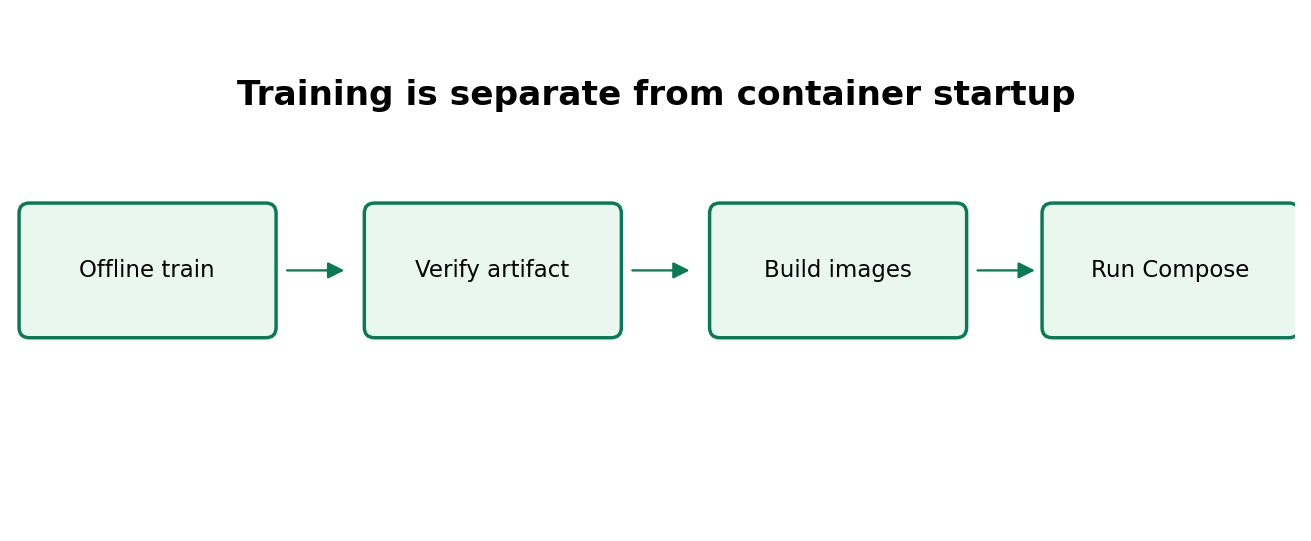
Model training belongs in a separate offline script, not in an application startup command. Our train_model.py retrieves the documented source, verifies required columns and the expected 1,460-row dataset, reserves a final test partition with seed 96, fits a median-imputation Random Forest Pipeline on the training portion, and compares it against a training-median baseline.
After evaluation, the script calculates genuine MAE and R², saves the complete Pipeline as a trusted Joblib artifact, writes metadata and a SHA-256 digest, reloads its own file and checks prediction consistency. Those steps must be run against real data before the API image is built. In this environment the authentic download was unavailable, so this article does not supply fabricated test MAE, R², successful real predictions or fake model files.
Why the fitted Pipeline must remain intact
An imputer calculates replacement values from the training records; the forest is fitted to the transformed training data. If deployment code recomputes those medians using visitors’ inputs or applies a different preprocessing order, the predictor no longer receives the representation for which it was trained. Saving the whole Scikit-learn Pipeline together avoids an unnecessary second implementation of fitted transformations.
A trained model file must also match the software used to load it. Scikit-learn explicitly cautions against relying on cross-version persistence compatibility. The student’s release must record Python and library versions, model feature names, source dataset and intended use. A container can package a versioned runtime but cannot automatically repair an incompatible artifact.
Model artifact security: why Joblib deserves caution
Joblib uses Python pickle-based serialization mechanisms, which can execute arbitrary code during loading. Never let public users upload a model and pass it directly to joblib.load. Our API only loads the locally reviewed training artifact after comparing expected schema, version and the recorded checksum. This helps find accidental file changes relative to metadata but is not independent proof of authenticity if an attacker can replace both files.
Alternatives such as ONNX and skops.io have their own support limitations, conversion requirements and trust models. Use the representation appropriate to the model and serving architecture, with independent provenance checks. An educational container that runs a malicious binary securely is still unsafe.
A Dockerfile: the recipe for an image
A Dockerfile records build instructions. FROM selects a base image, WORKDIR sets the working directory, COPY brings files into the build, and RUN executes steps during image construction. ENV sets runtime environment variables. USER selects a process identity; EXPOSE documents a port; CMD defines the default startup command.
EXPOSE 8000 is documentation rather than host port publication. A process inside the container must listen on the correct interface; publishing host ports is a separate Docker or Compose operation. Students often confuse image construction, container startup and exposing a network service, but each happens at a different stage.
The FastAPI Dockerfile explained
The companion Dockerfile.api uses a Python 3.12 slim base, installs the API runtime dependencies, creates a dedicated non-root user, copies the FastAPI code and the separately verified model directory, and starts Uvicorn on container port 8000. The training dataset itself is not copied into the runtime image. The Streamlit code also does not train a model during the API startup.
The base-image tag and dependency versions in the supplied source are educational starting points. Before a protected release, verify the actual base-image digest, use an approved lockfile and confirm package compatibility. Copy the model only after genuine offline training and independent review. An empty model/ folder deliberately causes readiness failure rather than imaginary inference.
FROM python:3.12-slim
WORKDIR /app
COPY requirements.api.txt /app/requirements.api.txt
RUN python -m pip install --no-cache-dir -r /app/requirements.api.txt \
    && useradd --uid 10001 --create-home appuser
COPY --chown=appuser:appuser services /app/services
COPY --chown=appuser:appuser model /app/model
USER appuser
EXPOSE 8000
CMD ["uvicorn","services.api.main:app","--host","0.0.0.0","--port","8000"]
Build and run the API container locally
After generating the authentic approved model files, run docker build -f Dockerfile.api -t ml-fastapi:1.0 .. The -f flag chooses the Dockerfile and -t assigns a local name and tag. The final dot selects the current folder as the build context. To run a temporary container for local testing, use docker run --rm -p 127.0.0.1:8000:8000 ml-fastapi:1.0.
The host loopback binding restricts the published development port to local host access. Then open http://127.0.0.1:8000/docs, inspect the actual API and test a valid request plus invalid inputs. None of these steps has been verified here with Docker, and the local name does not mean an image exists on Docker Hub or GHCR.
FastAPI endpoints and request validation
The backend provides GET /health for basic process liveness, GET /ready for loaded-model readiness, GET /model-info for selected safe metadata and POST /predict for a validated six-feature JSON request. Pydantic rejects unexpected fields, nonfinite numeric values and out-of-range quantities; the implementation converts the values into a labelled DataFrame in the model’s original feature order.
A 422 response usually indicates invalid request content. A 503 response can indicate that the required model is unavailable; a 500 indicates an unexpected failure or invalid model output. The API should never invent a positive house price merely to satisfy a demonstration. Even a 200 response does not prove that historical prices generalize to today’s market.
Why the frontend should not load the model
Streamlit’s job is to present a friendly form, accept six property measurements, submit JSON to FastAPI, and display the returned historical estimate or an understandable error. It does not need to read the training dataset, import Scikit-learn or deserialize a second model file. Eliminating these unneeded responsibilities reduces dependencies, image size and potential inconsistency.
The frontend’s source is services/web/streamlit_app.py. It uses st.form, bounded numeric inputs, requests.post with a timeout and st.metric. The application includes clear educational disclaimers and handles unavailable APIs without printing sensitive tracebacks to visitors.
The Streamlit Dockerfile
The second image uses Dockerfile.web. It installs Streamlit and Requests, creates a non-root user, copies only the shared service source and launches the Streamlit server on port 8501. It does not include the model directory or Scikit-learn. The current package records an unverified bounded Streamlit dependency specification because this environment could not install and test Streamlit; learners must pin and verify a compatible version before a protected release.
Students can build the frontend using docker build -f Dockerfile.web -t ml-streamlit:1.0 ., but a standalone frontend needs an API it can reach. Simply starting another container does not mean that localhost:8000 inside Streamlit points to the backend. This leads to the most important networking concept in this lesson.
Docker Compose: one configuration for two services
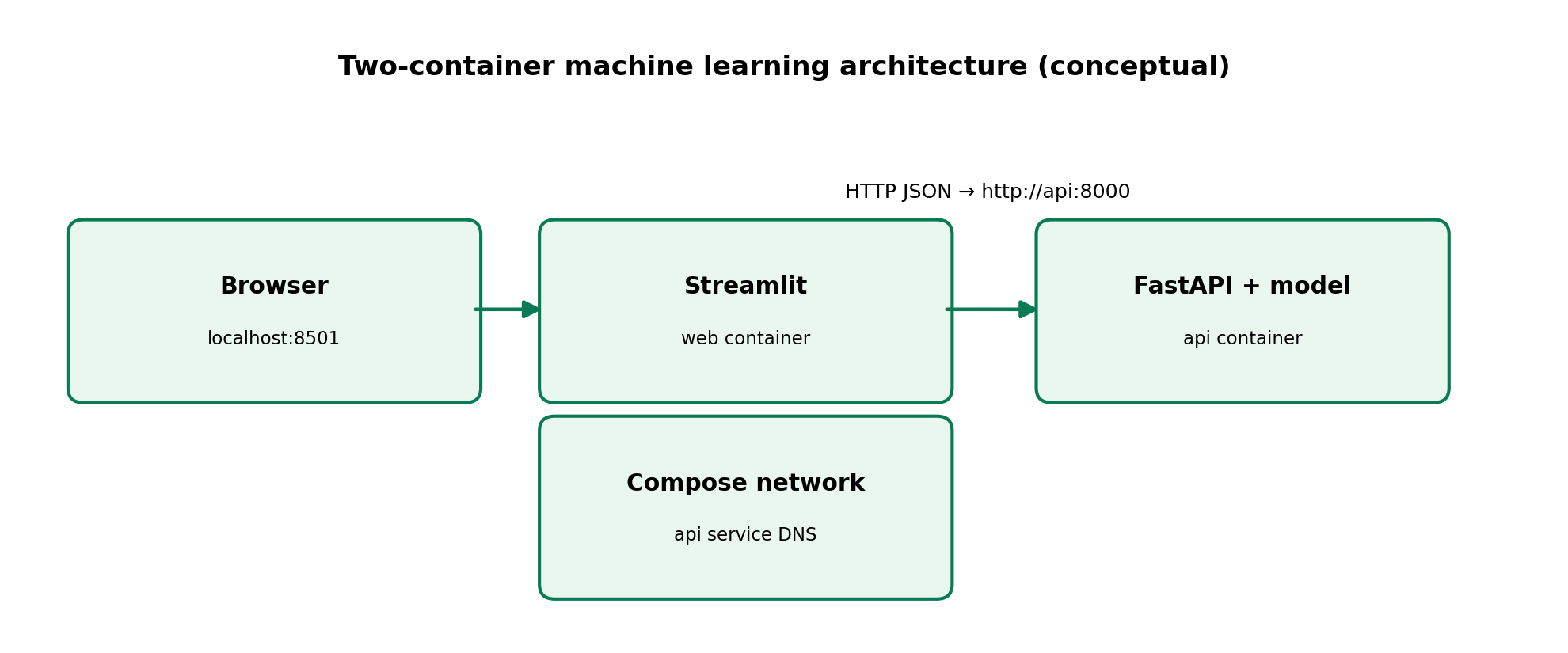
Docker Compose is a tool for describing and running an application with multiple services, networks and selected storage. In our compose.yaml, service api builds the FastAPI image and service web builds the Streamlit image. Each gets its own runtime. Compose creates a shared network where the services can discover each other by their configured names.
Compose is especially useful for local development and modest deployments. It does not by itself give a production app global autoscaling, high availability or Kubernetes-style scheduling. In this project, it brings two services together, supplies the correct internal API URL and waits for the API to pass its readiness check before starting the frontend.
Why localhost is different inside each container
A beginner might assume Streamlit should call http://localhost:8000, because that works from the laptop browser. But inside the Streamlit container, localhost refers to that same Streamlit container. The FastAPI service is a different container. Compose provides service-name discovery, so Streamlit should call http://api:8000 across the shared network.
The laptop browser reaches Streamlit through the published host port http://localhost:8501. The Streamlit server makes the API request using its configured API_BASE_URL; the browser itself does not need to resolve the internal api hostname. Understanding the boundary between host networking and internal container networking prevents a common class of deployment failures.
Complete two-service Compose configuration
The Compose file names both build targets, uses local image tags, publishes API and frontend ports only on the host loopback interface, sets API_BASE_URL=http://api:8000 inside the frontend, and defines HTTP health checks. Each health check uses Python’s built-in urllib.request, so the images do not need an additional curl package solely for testing.
The web service declares depends_on: api: condition: service_healthy. Compose will wait for the API’s readiness endpoint before starting the web service, according to supported Compose semantics. This is startup ordering, not a guarantee that the API can never fail afterward; the Streamlit code must still handle timeouts and connection errors.
services:
  api:
    build:
      context: .
      dockerfile: Dockerfile.api
    image: ml-fastapi:1.0
    ports:
      - "127.0.0.1:8000:8000"
    healthcheck:
      test: ["CMD", "python", "-c", "import urllib.request; urllib.request.urlopen('http://127.0.0.1:8000/ready', timeout=3).read()"]
      interval: 15s
      retries: 5
      start_period: 20s
  web:
    build:
      context: .
      dockerfile: Dockerfile.web
    image: ml-streamlit:1.0
    ports:
      - "127.0.0.1:8501:8501"
    environment:
      API_BASE_URL: http://api:8000
    depends_on:
      api:
        condition: service_healthy
    healthcheck:
      test: ["CMD", "python", "-c", "import urllib.request; urllib.request.urlopen('http://127.0.0.1:8501/_stcore/health', timeout=3).read()"]
      interval: 15s
      retries: 5
Docker health checks are not model accuracy tests
A process can exist while an application is unresponsive. A configured Docker health check runs a command repeatedly and marks its result. Our API uses /ready, which depends on a loaded approved model. The frontend uses Streamlit’s documented /_stcore/health endpoint. Their status helps diagnose readiness and startup failures.
Neither endpoint evaluates model accuracy against true prices. A completely inaccurate model can still be healthy in the operational sense. Conversely, a correct model cannot serve users if its container is unavailable. Monitoring and testing should maintain this distinction.
Start, inspect and stop the Compose stack
After an authentic model is available and Docker is installed, run docker compose config to parse and inspect the configuration. Then docker compose up --build -d builds images and starts services in the background. Check docker compose ps, docker compose logs api and docker compose logs web before opening the browser on localhost port 8501.
Students should verify real outputs rather than assuming that a successful command means every health check passed. Stop the project with docker compose down. Avoid docker compose down -v if the project later uses named volumes containing valuable state: the additional flag can remove those volumes.
docker compose config
docker compose up --build -d
docker compose ps
docker compose logs api
docker compose logs web
# In the browser: http://localhost:8501
# API documentation: http://localhost:8000/docs
docker compose down
Port mapping, host binding and public exposure
A mapping such as 127.0.0.1:8501:8501 has a host binding address, host port and container port. The binding exposes that container port through the host loopback interface. The application inside the container must also listen on the appropriate interface—usually 0.0.0.0—to accept network connections through the container’s network interface.
For a public deployment, do not simply change every host binding to all interfaces without review. Use an approved hosting configuration, TLS and an appropriate reverse proxy or ingress. Decide whether the public needs the frontend only, or whether access to the API should also be permitted. Keep the least necessary endpoints exposed.
Environment variables and secrets
The frontend’s non-secret API_BASE_URL configures where it sends requests. Environment variables can be a good fit for harmless runtime settings. Credentials, passwords, cloud access tokens and private API keys are different: do not hardcode them in Dockerfiles, public Compose source or client-visible browser scripts. Use the hosting platform’s supported runtime secret mechanism.
Docker Compose secrets and BuildKit secret mounts support different needs. Runtime secrets make authorized private values available to a container; build secrets can support controlled dependency retrieval without committing the secret into an image layer. Ordinary Dockerfile ARG and ENV are not safe general-purpose secret stores. Our educational project needs no API key, so it deliberately introduces none.
Use .dockerignore to protect the build context
Docker sends a build context to the builder. Without a suitable .dockerignore, the context might contain virtual environments, Python caches, raw datasets, local secrets, private reports and test outputs. Our ignore file excludes those unnecessary files but deliberately retains the trusted model/ directory because the API Dockerfile must copy the verified fitted Pipeline.
A .gitignore controls Git tracking, not which files Docker receives. Excluding something from Git does not automatically exclude it from a Docker build. Inspect the actual context and image contents before publishing, and ensure the trusted model is authorized for the selected audience.
Image layers, caching and dependency order
Dockerfiles commonly copy package requirements and install dependencies before copying frequently changing source. If only an application file changes, the builder may reuse a prior dependency layer and save time. This is one reason the project copies requirements.api.txt separately from the Python application. Ordering steps makes repeated builds more efficient.
A cached layer is not a guarantee that a dependency remains secure or current. Deliberate rebuilds, vulnerability updates and reviewed version changes remain necessary. Cache behaviour also depends on build inputs, chosen builder and any pinned image references.
Keep runtime images reasonably small
A Python API container may need Pandas, NumPy, Scikit-learn, Joblib, FastAPI and Uvicorn. The Streamlit container needs Streamlit and an HTTP client, but it does not need the saved forest or numerical training packages. This separation reduces the frontend’s dependencies and can reduce image size and vulnerability exposure.
Slim base images and well-scoped COPY commands can reduce unnecessary content. Multi-stage builds can isolate compilation or build tooling from the final runtime image, but they do not automatically produce a smaller result in every Python project. If copying prepared environments across stages, keep architecture, interpreter, ABI and dependency compatibility consistent.
Volumes, bind mounts and persistent storage
A bind mount maps a host path into the container; a named volume is storage managed by Docker. Files copied into an image at build time are a third category. The basic student project packages a trusted model inside the approved API image, so it does not require a volume or a database simply to show predictions.
For more complex applications, a controlled mount can supply approved models or persistent reports, but the mount must remain trusted. A host file substituted by an untrusted user can become an unsafe Joblib deserialization risk. Likewise, do not store important uploads only in a container’s disposable writable filesystem.
Non-root containers and least privilege
The backend and frontend Dockerfiles create and select a dedicated application user rather than starting the main process as root. This limits some types of damage if a service is compromised, especially when combined with appropriate filesystem permissions and non-privileged runtime configuration. It does not remove every security risk or make a vulnerable service safe by itself.
Avoid mounting the Docker socket into application containers. Do not run containers in privileged mode to bypass ordinary permissions problems. Review host port exposure, image provenance, secrets, resource limits, filesystem access and dependency vulnerabilities as part of a broader security audit.
Reproducible builds, tags and digests
For reliable releases, record the source revision, model artifact digest, Python version, installed package versions, Dockerfile contents, base-image digest and target architecture. Image tags such as ml-fastapi:1.0 are convenient names, but tags can change. A verified image digest points to a specific content-addressed manifest and is more appropriate for tracking an approved release.
Reproducibility is not automatically byte-for-byte identity on every processor and builder, especially if dependencies or upstream resources change. A fixed random seed helps repeat model training, but cannot replace a stable dataset and compatible environment. The package uses documented local names, not invented published registry addresses.
Docker Hub, GHCR and what publication does not mean
Docker Hub and GitHub Container Registry store images for authorized distribution. A developer builds a tested image, inspects it for secrets and vulnerabilities, authenticates to the chosen registry, tags it under an authorized account and pushes it. The resulting image reference and digest should be verified after publication. Actual registry permissions and costs depend on the provider and account.
Pushing an image does not make the API live. A separate authorized hosting platform must pull the image, run the containers, configure networking and security, and pass genuine smoke tests. No registry connection or cloud deployment has been used for this Topic 96 project.
Docker and GitHub Actions CI/CD
Topic 95 explained how GitHub Actions can run Python tests, verify model candidates and build approved container images. For this Docker project, an authorized workflow could run syntax, schema and API fixture checks, validate Docker configuration, build two images, scan the output and require approval before publishing anything. Pull requests containing untrusted code must not receive production credentials or be allowed to deserialize arbitrary model artifacts.
Use least-privilege workflow permissions, reviewed action versions pinned by verified full commit SHAs where required, restricted deployment environments and a separate release decision. A green CI workflow is not proof of correct model inference on a real dataset, and image publication is not equivalent to a successful public deployment.
Troubleshoot the most common container problems
If docker is not found, verify installation and PATH. If the daemon cannot be reached, inspect Docker Engine/Desktop status. If a port is already allocated, identify the host process that owns it rather than stopping unrelated work. If the build fails, inspect Dockerfile syntax, COPY paths, dependencies and the actual build context. If the API fails startup, verify that approved model files really exist and have compatible metadata.
If Streamlit cannot reach FastAPI, check API_BASE_URL=http://api:8000, the Compose network and backend logs. If a service is unhealthy, call the intended health endpoint from the appropriate container and inspect logs. If FastAPI returns 422, verify the six JSON fields and their ranges. If it returns 500, inspect sanitized backend diagnostics. If a Dockerfile parses but the application exits immediately, inspect the configured startup command and installed Python packages.
| Symptom | Likely check | Safe response |
|---|---|---|
| Docker daemon unavailable | docker info | Start or repair the engine |
| Port already allocated | docker compose ps / local ports | Choose another unused host port |
| Missing model artifact | model files and metadata | Train and verify offline |
| API unreachable from Streamlit | API_BASE_URL and logs | Use api:8000 on Compose network |
| API 422 error | Request schema and ranges | Correct fields, not server validation |
| Container unhealthy | Health endpoint and service logs | Repair startup or readiness issue |
| Excess image size | COPY, requirements, layers | Remove unnecessary build inputs |
Test the integrated system with genuine evidence
A complete acceptance procedure begins with authentic model training and held-out regression metrics. Next, run the Python test suite, validate Compose configuration, build each image and start both services. Check that /health responds, /ready confirms model availability, and /model-info reports the intended model version. Use /predict with the same six inputs sent from Streamlit.
Then test invalid fields, unavailable backend handling, timeouts, health checks, logs and shutdown behaviour. The predicted value should be finite and match the result from the saved Pipeline for the same labelled record. Record exact commands, versions and actual outputs. Our locally executed tests cover synthetic fixture behaviour and static Compose assertions, not a live Docker integration run.
Responsible AI, privacy and educational limitations
The Ames data reflect historical transactions in one place and time. A six-feature forest excludes many relevant market factors, and a container cannot turn it into a present-day global valuation tool. Avoid using the educational result to make lending, home-buying or investment decisions. A plausible dollar figure on an attractive interface should not be mistaken for independent evidence that the predicted price is correct.
Do not log unnecessary visitor inputs or identifying addresses, and do not retain them merely because the technology allows it. If a later student project uses health or school records, privacy, lawful access, bias analysis and human oversight become even more important. Explainability and container security are useful safeguards but cannot replace domain validation.
Updating and rolling back a containerized model
A responsible update requires an approved new model, verified artifact metadata, a compatible dependency bundle, passing tests, a new image build and a documented release decision. If a new image fails readiness or returns unacceptable predictions, an operator should stop further promotion and restore the previous approved image and model version. Verify that schemas and external dependencies still match before attempting rollback.
Maintain immutable image identifiers and a clear record of which model each image contains. A container restart does not automatically change a loaded model’s artifact; an image tag update does not necessarily update already running processes. A production rollback should be rehearsed on the actual approved hosting environment and documented.
Ten-task student capstone: the two-container model application
Tasks 1–3: install Docker safely, verify its client/Engine/Compose, document the six historical feature definitions, retrieve OpenML 42165 from an approved source, and run the offline training and held-out evaluation. Tasks 4–6: validate the fitted Pipeline, record metadata and digest, inspect FastAPI’s Pydantic schema and tests, then build the API and Streamlit images.
Tasks 7–10: use Compose to connect the two services, confirm API readiness and valid/invalid responses, test the same record through the browser, inspect health checks and logs, evaluate runtime permissions and secrets, then write a release report with Docker versions, actual test outputs, model limitations, image identities, resource observations and a rollback plan. Submit evidence, not just copied commands.
Thirty original student practice questions with answers
Question 1: What is Docker?
Worked answer: A platform for building, distributing and running containerized applications.
Question 2: What is a Docker image?
Worked answer: A packaged template from which containers can be created.
Question 3: What is a container?
Worked answer: A runtime instance created from an image.
Question 4: Why are images and containers not synonyms?
Worked answer: Images are templates; containers are instances with runtime state.
Question 5: How do containers differ from full virtual machines?
Worked answer: Ordinary Linux containers share a host Linux kernel, whereas full VMs run guest OS kernels.
Question 6: What does Docker Engine do?
Worked answer: It provides image, container and related runtime operations.
Question 7: What does docker info check?
Worked answer: The client connection to an engine and information about it.
Question 8: What does docker build do?
Worked answer: Creates an image from a Dockerfile and build context.
Question 9: What does Dockerfile FROM specify?
Worked answer: The base image.
Question 10: Does EXPOSE publish a host port?
Worked answer: No, runtime port publishing is separate.
Question 11: What is the purpose of .dockerignore?
Worked answer: Exclude unnecessary or private files from the build context.
Question 12: Why separate requirements from source COPY?
Worked answer: To improve build cache reuse when only code changes.
Question 13: Which six model features are required?
Worked answer: GrLivArea, OverallQual, YearBuilt, TotalBsmtSF, GarageCars and FullBath.
Question 14: What is the model target?
Worked answer: SalePrice in the historical Ames dataset.
Question 15: Why save the full Pipeline?
Worked answer: It preserves fitted preprocessing and model behaviour together.
Question 16: Why is loading unknown Joblib unsafe?
Worked answer: Pickle-based loading can execute arbitrary code.
Question 17: What is the API service name in Compose?
Worked answer: api.
Question 18: What is the frontend service name?
Worked answer: web.
Question 19: Which internal address should Streamlit use?
Worked answer: http://api:8000.
Question 20: Why not use localhost:8000 in the web container?
Worked answer: That refers to the web container itself, not the API container.
Question 21: What is the browser URL during local testing?
Worked answer: http://localhost:8501, assuming the specified mapping and running services.
Question 22: What is the FastAPI docs URL?
Worked answer: http://localhost:8000/docs during the configured local run.
Question 23: What does depends_on service_healthy mean?
Worked answer: Wait for the API health condition at dependent service startup.
Question 24: Does a healthy API guarantee accurate prices?
Worked answer: No; it checks operational readiness, not model predictive quality.
Question 25: What is a named Docker volume?
Worked answer: Storage managed by Docker independently of an individual container writable layer.
Question 26: What does a non-root USER achieve?
Worked answer: It reduces some privileges available to the application process.
Question 27: What does docker compose down do?
Worked answer: Stops and removes project containers and managed networks.
Question 28: Why can down -v be risky?
Worked answer: It can remove managed volumes containing persistent data.
Question 29: What is the difference between image push and deployment?
Worked answer: Push stores an image in a registry; deployment runs it on an authorized host.
Question 30: What evidence proves the student project runs?
Worked answer: Verified model metrics, passing integration tests, real Docker build/Compose/health results and actual accessible service behaviour.
Eight practical troubleshooting scenarios
Scenario 1: Both images build but the API says its model is missing.
Check offline training and COPY paths; a successful image build does not mean an approved model was supplied.
Scenario 2: Streamlit uses localhost:8000 and cannot connect.
Change the internal API_BASE_URL to http://api:8000.
Scenario 3: The API process exists but /ready returns an error.
Investigate trusted model loading and readiness instead of assuming the container is healthy.
Scenario 4: The backend responds, but its prediction has an invalid numerical value.
Reject the response and investigate model inference; never invent a substitute output.
Scenario 5: A student copies private .env files into the build context.
Remove sensitive files, rotate any exposed credentials and correct .dockerignore and build security.
Scenario 6: A larger new model doubles API memory consumption.
Measure resource requirements and deployment limits; avoid arbitrary worker increases.
Scenario 7: Compose waits for the API to become healthy but the API later crashes.
The frontend still needs timeouts and error handling; startup ordering is not permanent availability.
Scenario 8: A new image was pushed to GHCR but nobody can open the app.
Configure and verify a running host: a registry is storage, not execution.
Four-week Docker learning roadmap
Week 1: learn Docker architecture, Docker CLI, images, containers, VMs, installation and safe cleanup. Verify a working Engine and experiment with a harmless sample container. Week 2: inspect the model source, verify dataset access, train offline, record held-out metrics and build a trusted FastAPI image.
Week 3: containerize the Streamlit frontend, compare host and container networking, set the API service URL, configure Compose, inspect health checks and test valid and invalid predictions. Week 4: audit security and runtime resources, review image layering and reproducibility, plan CI/CD and authorized deployment, document actual tests, model limitations and rollback procedures.
Frequently asked questions about Docker and machine learning
What is Docker used for in machine learning?
Packaging a trained model’s application and compatible dependencies into runnable images, often for API or web serving.
Can Docker train machine learning models?
It can host training code, but this project trains offline and keeps inference containers independent of training.
Is Docker Compose the same as Docker Engine?
No; Compose coordinates multi-service applications using an available container runtime.
Does Docker Compose require Kubernetes?
No; it has its own configuration and execution workflow.
Why are there two images in this tutorial?
The API handles trusted model inference, while Streamlit handles the user interface.
Can the frontend access localhost:8000 to reach FastAPI?
Not when localhost refers to the separate Streamlit container; use api:8000 on the Compose network.
Can I test the Python app without Docker?
Yes, many schema and API tests can use controlled synthetic fixtures; that does not establish container integration.
Is the included model trained on Ames data?
No, authentic OpenML access was unavailable; the offline training source is included without fabricated artifacts.
Did the two images build successfully here?
No Docker Engine or Compose was available for execution here.
Is Streamlit already tested in a browser?
No, Streamlit was not available in the authoring environment; the browser and Docker checks remain for learners to execute.
Can I publish Docker images for free?
Registry terms, privacy controls, quotas and hosting costs vary; verify current provider policy.
Does a published image mean the application is live?
No; an authorized hosting provider must run and expose it.
Can a Docker container be completely secure because it runs as non-root?
No. Non-root execution is only one defense.
What is a container health check?
A repeated command whose success or failure helps indicate container-service health.
Can I use the historical estimate as a current professional appraisal?
No; the six-feature historical educational model is not validated for that purpose.
Trusted technical references and previous Notes for SHS topics
Read Docker official documentation, Dockerfile reference, Docker Compose documentation, Compose networking, Compose readiness and startup order, FastAPI Docker deployment, Streamlit Docker deployment and Scikit-learn model persistence. Check platform-specific installation and hosting terms against current source material.
Related Notes for SHS lessons include Topic 95 — CI/CD with GitHub Actions, Topic 94 — MLOps Monitoring, Topic 93 — FastAPI, Topic 92 — Streamlit and Topic 90 — Feature Engineering.
Conclusion: Docker packages responsibility, not certainty
Docker helps students package compatible runtimes, assign clear responsibilities to application services and coordinate networking and health checks. In this project, a separately trained and verified Pipeline belongs in FastAPI, while Streamlit sends a six-feature JSON request over Compose’s internal network. Learning why api:8000 is correct, why model loading must be trusted and why health is not the same as accuracy develops practical engineering judgement.
The completed companion source and locally passing tests provide a foundation for learners to finish real-model training, Docker builds, Compose integration and later authorized hosting. Record what actually runs, correct failures and do not claim live status before verifying an accessible service. Packaging a program makes it easier to reproduce a runtime; making machine-learning predictions trustworthy remains a separate responsibility.
Companion student project: Download the complete Topic 96 source package from the publication report. It includes two Dockerfiles, Compose YAML, FastAPI backend, Streamlit frontend, offline training script, 15 locally passing tests, conceptual diagrams, requirements, README, model card, deployment guide, security checklist and troubleshooting manual. No fabricated Ames artifact, Docker build output, registry URL or live service is supplied.


1 response to “Docker for Machine Learning Beginners: Containerizing Python Models, FastAPI and Streamlit Applications”