Model Deployment for Beginners: How to Turn a Machine Learning Model into a Web App with Streamlit
A student has spent several lessons learning how machine learning works. Their Random Forest performs reasonably well in a Jupyter notebook, but nobody else can use it without installing Python and running the code. A classmate asks a simple question: Can I enter information in a web page and see a prediction? Building that bridge—from a tested model to a reliable interactive application—is the purpose of model deployment. A working interface, however, does not turn an inaccurate or insecure model into a trustworthy one.
In this complete beginner’s guide, you will learn to deploy a machine learning model with Streamlit: train and validate a six-input regression model, save its entire preprocessing Pipeline, create a browser form, validate inputs, load a trusted serialized model, test inference and prepare a GitHub project for Streamlit Community Cloud. The project continues Topic 91: Explainable AI and Topic 90: Feature Engineering, without repeating their complete lessons.
Verified project status, 25 November 2026: Original Python training and Streamlit source files, tests, metadata schema, deployment diagrams, workbook and a ZIP package were created. All Python files passed syntax compilation and two self-contained tests passed; the third model-dependent test was skipped. OpenML dataset 42165 could not be downloaded due to a network/DNS restriction, and Streamlit is not installed in the authoring environment. Thus there is no authentic trained Ames model, no verified local Streamlit browser run, no GitHub repository and no deployed Streamlit URL in this article. Do not copy example numbers into a report as actual model results. Run the supplied project in an internet-enabled and compatible environment to complete those steps.
What is machine learning model deployment?
Model deployment means making a trained prediction system available to an intended user or application in a controlled environment. During model development, a data scientist checks source data, preprocesses features, trains algorithms, compares validation scores and evaluates a selected model. During deployment, a software application loads the approved model, checks new input data, produces predictions, responds to errors and remains maintainable as conditions change.
The saved model is only one component. A complete deployment also requires an appropriate interface or API, compatible software dependencies, reliable artifact storage, access controls where necessary, documented behaviour and operational monitoring. A perfectly serialized model that is loaded with mismatched features can produce invalid results. A polished webpage that accepts nonsensical inputs can also fail despite technically successful Python execution.
Training and inference are different operations
Training estimates model relationships from a suitable dataset; in a Random Forest, training builds an ensemble of decision trees. Inference supplies a new feature row to that already fitted ensemble and obtains its prediction. The first task may require substantial computation and many training records; the second ordinarily takes a short model call after the artifact is loaded.
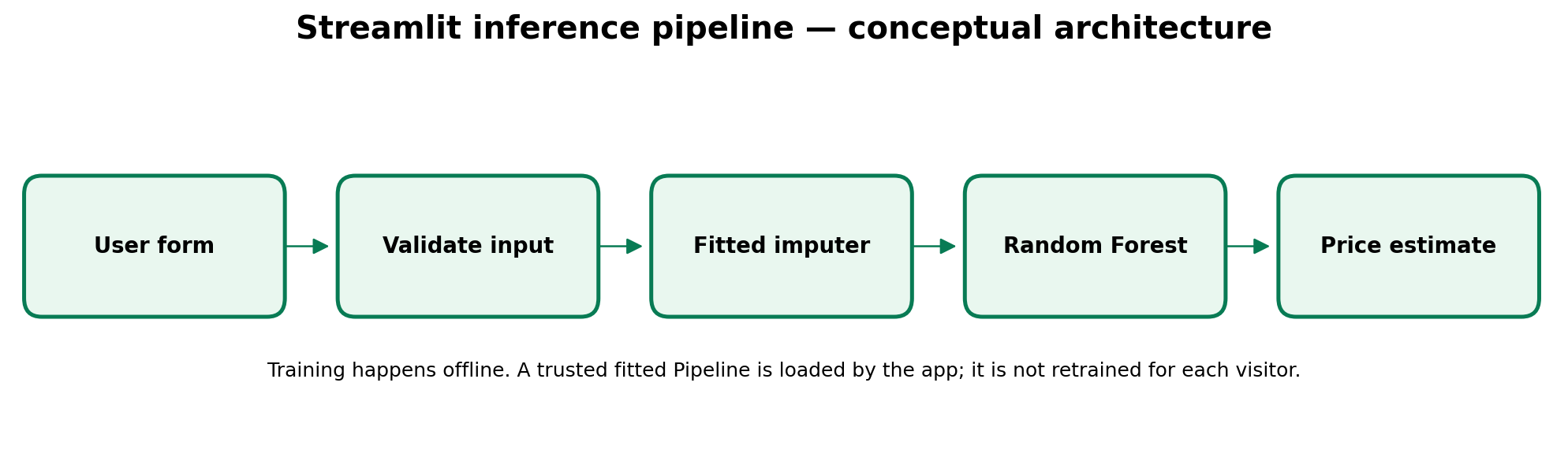
Our architecture trains the regression model offline and saves it to model/ames_model.joblib. The Streamlit server then loads that trusted fitted Pipeline once per suitable cache lifecycle and uses it for visitor requests. It does not download Ames Housing, recompute medians or refit the forest each time somebody presses the estimate button. This separation makes results more predictable and makes the deployment easier to audit.
How a machine learning web app works
A visitor fills in a Streamlit form on their device. A Python server receives the values, checks their types, units and permitted ranges, creates a labelled Pandas DataFrame using the original feature schema, passes it through the saved fitted preprocessing Pipeline and calls the Random Forest prediction method. The application then validates the result and displays it in clear language.
Streamlit communicates between a browser interface and server-side Python. It is not merely a static HTML file and it does not automatically run the Random Forest entirely on the visitor’s phone. Therefore, availability depends on server resources, installed packages and the hosting service. Predictions should be fast enough for the intended use, but no resource configuration guarantees uninterrupted uptime.
What is Streamlit and why use it?
Streamlit is a Python framework for creating interactive data and machine-learning applications. A script can display headings, explanatory text, input forms, tables, charts, metrics, warnings and errors. For students already comfortable with Python, it reduces the need to write a full JavaScript front end merely to demonstrate a model. It is particularly useful for educational portfolios, research prototypes and interactive demonstrations.
Streamlit is not the only deployment option. Flask is a flexible Python web framework; FastAPI is commonly used for typed API services; Gradio supports interactive model demos. Large production applications may need authentication, databases, queues, resource scaling and specialised infrastructure. Choosing Streamlit for this lesson is a teaching decision, not a claim that other frameworks are inferior.
| Tool | Typical purpose | Beginner consideration |
|---|---|---|
| Streamlit | Interactive Python data applications | Straightforward forms and model displays |
| Flask | General-purpose Python web application | More explicit routing and app structure |
| FastAPI | Typed services and APIs | Suited to programmatic model endpoints |
| Gradio | Interactive machine learning demos | Convenient model-focused interfaces |
Local development is not cloud deployment
During local development, streamlit run streamlit_app.py starts a Python web server on the developer’s machine. A browser may open at http://localhost:8501, although the port can change. That address is local to the machine and is not automatically accessible to classmates around the world. Local success demonstrates that an app can operate in one environment, not that external hosting is ready.
Cloud deployment requires a supported service, repository or deployment package, compatible Python environment and a verified accessible URL. The target for this lesson is Streamlit Community Cloud, but neither a GitHub repository nor a live deployment has been created here. Once a student completes the cloud procedure, the public address must be opened and tested before it is added to the WordPress lesson.
Prepare Python and a virtual environment
Install a supported Python version and open a terminal in a dedicated project directory. A virtual environment keeps project libraries separate from unrelated software on the computer. On Windows PowerShell use python -m venv .venv, then .venv\Scripts\Activate.ps1. On macOS or Linux use the same creation command, then source .venv/bin/activate. If the platform uses python3 instead of python, follow that environment’s actual executable.
Install runtime packages with python -m pip install streamlit scikit-learn pandas numpy joblib and verify them with python -m pip show streamlit scikit-learn. The supplied requirements.txt intentionally does not claim untested Streamlit version pins: it must be pinned after a complete working environment is established. Keep the Python version aligned between training and deployment. Model loading across incompatible Scikit-learn versions is not a supported persistence workflow.
python -m venv .venv
# Activate the environment for your operating system
python -m pip install -r requirements.txt pytest
python --version
python -m pip show streamlit scikit-learn
# Only after verifying source and internet access:
python train_model.py
python -m pytest -q
streamlit run streamlit_app.py
Understand the project structure
The companion archive has the entry point streamlit_app.py, the offline training program train_model.py, requirements.txt, a README.md, a .gitignore and subfolders for model files, tests, documentation and visuals. The model directory is initially empty because no authentic Ames model was fabricated. The training program creates the model and metadata only after it has successfully retrieved and verified the real source.
The documentation includes a model card, cloud deployment checklist, troubleshooting guide, security checklist, student worksheet, practice questions, formula sheet and an Excel-compatible workbook. Each file serves a distinct purpose: a student can check code, reproduce the experiment and see exactly what remains to be verified. A raw copy of the Ames dataset need not be placed in the deployed repository if the trained artifact is permitted for distribution.
streamlit-ml-deployment/
  streamlit_app.py
  train_model.py
  requirements.txt
  README.md
  .gitignore
  model/                 # Ames files generated only after real training
    ames_model.joblib    # NOT INCLUDED in initial package
    model_metadata.json  # NOT INCLUDED in initial package
  tests/
    test_prediction.py
    test_model_integrity.py
  assets/
    deployment_workflow.png
    validation_split.png
  docs/
    model_card.md
    deployment_checklist.md
    troubleshooting.md
    security_checklist.md
    topic92_deployment_workbook.xlsx
The historical Ames Housing prediction project
The planned data source is OpenML dataset 42165, house_prices. Its commonly used version contains 1,460 historical housing-sale records from Ames, Iowa, with 79 explanatory variables and a target called SalePrice. We deliberately use only six numerical inputs so the Streamlit form remains understandable and the fitted Pipeline is straightforward to inspect. Those inputs are GrLivArea, OverallQual, YearBuilt, TotalBsmtSF, GarageCars and FullBath.
The purpose is to demonstrate historical regression inference, not to forecast current house prices or advise anybody about buying, selling, borrowing or investing. The training records are from one place and period, with important variables omitted. A student may see a plausible number on the interface, but that number is a model output—not a professional valuation, promised sale price, forecast interval or evidence that the home is worth the quoted amount today.
| Form field | Exact model column | Units/meaning |
|---|---|---|
| Living area | GrLivArea | Above-ground square feet |
| Quality rating | OverallQual | Ordinal rating |
| Year built | YearBuilt | Construction calendar year |
| Basement area | TotalBsmtSF | Square feet |
| Garage capacity | GarageCars | Number of cars |
| Full bathrooms | FullBath | Count above grade |
Why feature names, order and units must match
A model trained with six inputs expects those same six definitions at inference time. An area field measured in square metres cannot silently be passed as though it were square feet. Garage capacity should not be mistaken for garage floor area. If a positional array uses the wrong order, a construction year might accidentally be interpreted as living area, corrupting the prediction. Errors may occur even when every supplied value is numeric.
The application therefore saves and checks the ordered list of names in model metadata and creates pd.DataFrame([input_values], columns=feature_order). The model is trained using a DataFrame with matching names. A reliable schema check tests names, order, units, types and expected source definitions. Merely checking that the same set of six names appears somewhere is insufficient if values are assembled positionally.
Train and evaluate before saving
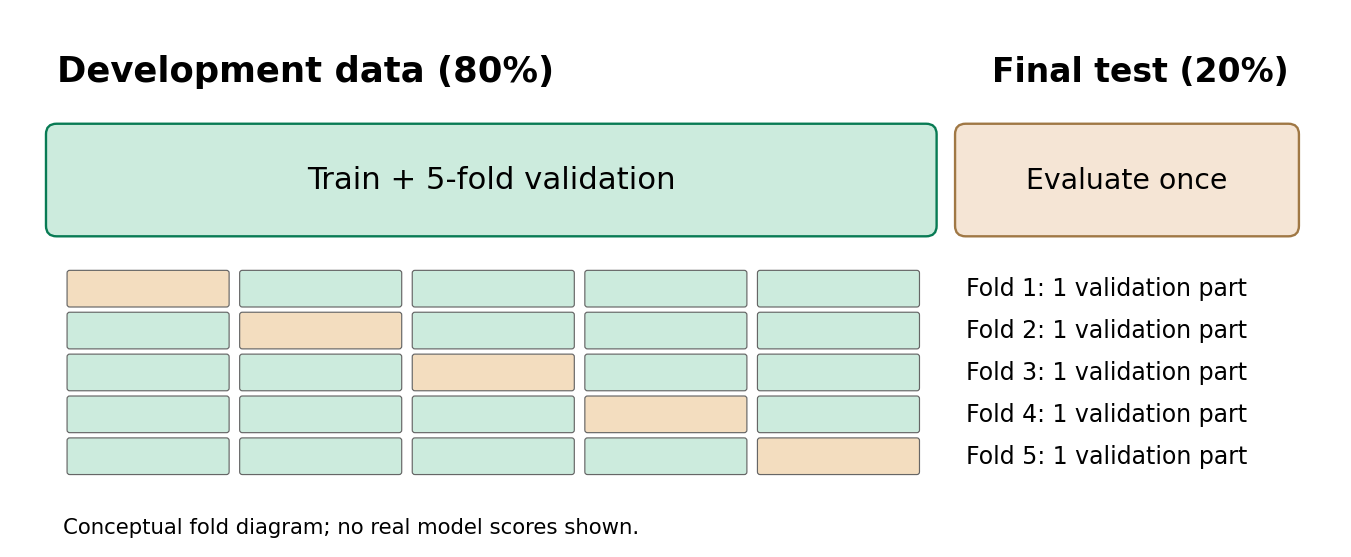
The training program retrieves OpenML 42165, checks expected columns and row count, converts inputs and targets to numeric values, and rejects unexpected invalid target values rather than silently fabricating replacements. It reserves 20% of records for a final held-out test using seed 92. The other 80% supplies model fitting and five-fold cross-validation. With all expected records valid, the split contains 1,168 development and 292 test observations.
The model Pipeline first imputes missing numeric inputs with medians learned from training data, then fits RandomForestRegressor(n_estimators=100, min_samples_leaf=2, random_state=92, n_jobs=1). A DummyRegressor(strategy='median') fitted on development targets supplies a minimum comparison. The script calculates mean training-only CV MAE, baseline held-out MAE, Random Forest held-out MAE and R² before saving its own trusted artifact. None of those Ames scores has been executed in this environment.
What does model evaluation mean for a deployed app?
Mean Absolute Error (MAE) is the average of absolute differences between actual and predicted prices. It uses the same currency units as the target and is easy to understand, although it does not capture every aspect of prediction quality. R² compares squared-error performance with a constant mean-based reference on the evaluated set and can be negative for weak out-of-sample predictions. Cross-validation provides additional evidence about model variability in the development data.
A hypothetical five-house calculation has absolute errors of $10,000, $15,000, $10,000, $15,000 and $5,000. Their sum is $55,000 and the fictional sample’s MAE is $11,000. This is classroom arithmetic, not the trained Ames model’s performance. The real Streamlit application should display only the actual historical test MAE stored after verified model training, and even that average is not a guaranteed bound on the error for one home.
Why save the entire fitted preprocessing Pipeline?
Suppose the training dataset contains missing basement measurements. During training, the median imputer learns a value from the training partition. If a deployed app manually calculates a different median from visitor data or uses zero instead, it is no longer feeding the model the same representation on which it was fitted. Storing only the forest without the imputer creates a fragile second implementation of preprocessing.
By serializing the Pipeline containing both imputation and the trained Random Forest, inference uses the same fitted preprocessing operations. This greatly reduces mismatch risk. More complex projects may also require custom preprocessing definitions to be installed in the serving environment; our beginner example deliberately avoids custom serialized functions. A fitted Pipeline does not solve future leakage, distribution shift or missing domain knowledge on its own.
What serialization actually does
Serialization writes a fitted object or a supported representation of it to a persistent file, so a separate process can load the model for inference. The sample uses joblib.dump(pipeline, MODEL_PATH) and later joblib.load(MODEL_PATH) to reload a model created inside the trusted project. A model file is not human-readable documentation; it must be paired with metadata about source data, schema, versions, validation and intended use.
Security warning: Joblib uses pickle-based mechanisms, and loading an untrusted serialized model can execute arbitrary code. Never accept public user-uploaded model files and pass them directly to Joblib. Scikit-learn also documents alternatives such as skops.io for supported use cases and ONNX when the required serving architecture permits. Each method has compatibility and trust limitations; replacing Joblib is not a substitute for reviewing source provenance.
Model metadata and SHA-256 integrity checks
The training script writes model_metadata.json beside the Joblib artifact, including dataset ID, target, exact ordered features, train/test counts, random seed, CV and held-out metrics, software versions, intended use, marginal training ranges and a SHA-256 digest of the saved artifact’s bytes. The app compares a newly calculated digest with the recorded value before attempting to load the model. This can detect unexpected file changes relative to the stored metadata.
A checksum alone is not proof of authentic origin or safety if an attacker can replace the model and its metadata together. File permissions, authorized repository controls, signed releases or other provenance mechanisms may still be needed. Our project assumes the artifact was generated and reviewed by the trusted local training process, and it instructs students to reject unfamiliar binaries.
Verify that reloaded predictions agree
After saving its fitted Pipeline, the training script reloads the same file it just created and predicts a few test feature rows. It compares those predictions to the original in-memory Pipeline with a numerical tolerance using np.testing.assert_allclose. This catches certain serialization or compatibility mistakes before a web app is published.
This is an inference-consistency check, not an independent measure of prediction quality. Both versions can agree perfectly and still be inaccurate if the training data are unrepresentative. Students should separately verify held-out error, schema order, imputation, nonfinite inputs and whether the model is genuinely suitable for the intended educational use.
Streamlit scripts, reruns and forms
Streamlit typically reruns relevant portions of a Python script when widgets change. A plain interface can therefore respond to every widget interaction, which may be convenient for small dashboards but unnecessary for multi-field predictions. Wrapping the six controls in st.form lets the visitor enter a complete set and then press st.form_submit_button before the application asks the model for an estimate.
The form uses numeric controls for quantities, a slider for the ordinal quality rating and visible labels for every unit. A visitor should not need to memorize raw column names: “Above-ground living area (square feet)” is clearer than “GrLivArea”. The application still maps the human-friendly labels back to the original feature schema before inference.
Understand the six essential Streamlit widgets
st.title displays the heading, st.write presents explanations, st.number_input collects bounded numeric values, st.slider helps select a quality rating, and st.form_submit_button submits the complete property form. st.metric makes the resulting historical estimate prominent, while st.dataframe shows the inputs used for prediction. These controls all perform a real role rather than serving as decoration.
st.info displays the educational disclaimer, st.warning explains values outside recorded training ranges, and st.error handles a failed load or prediction without printing internal exceptions to a public visitor. st.caption is useful for the currency and uncertainty disclosure. A dropdown such as st.selectbox is available for category inputs, but it is not required in this intentionally numerical six-field app.
Prevent invalid or misleading inputs
Input validation begins with type checks: the app must receive numerical values and avoid NaN or infinite numbers. Domain validation rejects physically nonsensical values, such as negative living area or a quality rating outside the documented scale. Feature-schema validation verifies exact names and order. Distribution checks warn when a value is lower or higher than the training values recorded in metadata.
A visitor might choose individually valid values that form an unusual combination. A house could have a plausible building year and area yet still be unlike any training example; simple marginal range checks do not detect every such case. Therefore the app displays a warning rather than promising reliability. A robust production system might need joint distribution checks and explicit out-of-domain rejection, but these are beyond the simple classroom prototype.
Model caching with st.cache_resource
Streamlit’s @st.cache_resource decorator is appropriate for many reusable, shared objects such as a read-only fitted model. The decorated loading function verifies files and metadata once for its cache lifecycle and returns the trusted Pipeline for repeated predictions. This avoids deserializing a large forest for every form submission and generally makes interactive use more efficient.
Cached resources may be shared across sessions, so they should not contain mutable user-specific records or be modified during inference. st.cache_data has a different role for suitable cached computations and data. Neither caching decorator guarantees safe thread behaviour for arbitrary objects; keep the model read-only and review the current framework documentation when adding complex state.
Session state and privacy
st.session_state is useful when a Streamlit app needs to remember selected options or temporary results across reruns during a visitor’s session. This small housing demo does not require a database, account registration or long-term storage of visitor inputs. Keeping the state minimal improves simplicity and avoids needless data collection.
Session state is not a secure durable datastore. If an advanced project later supports authenticated users, histories or real housing information, it will need a deliberate privacy and retention policy. Do not log sensitive visitor values indiscriminately, copy them into public repositories or treat an educational input form as permission to build personal profiles.
User-friendly error handling
If the model files are absent, a Streamlit application should display a maintainer-oriented error without pretending to make predictions. If the checksum fails, it should stop rather than loading the untrusted bytes. If an unexpected feature is supplied, it should reject the request. If inference returns an infinite, NaN or nonpositive price, it should avoid showing that number as a valid estimate.
The application’s source catches model-loading and prediction exceptions, then displays concise explanations. Detailed diagnostic information belongs in approved maintainer logs, not publicly visible stack traces or secret-bearing error messages. Testing should include both successful numeric input and intentionally invalid values rather than only the default form settings.
How to interpret the displayed historical price
The app formats a valid model output as a dollar amount and labels it Estimated historical sale price. It also reports the historical dataset source, training-row count and actual held-out test MAE once generated. These details help learners understand that the displayed number comes from a specific fitted estimator and a documented benchmark rather than an all-knowing valuation service.
Do not add a made-up “98% confidence” badge or invent a prediction interval. Point predictions do not automatically include calibrated uncertainty bounds, and average MAE is not a per-house confidence interval. If you want uncertainty estimates, that requires a separately justified and validated method. Visitors should also understand that nominal historical dollars are not adjusted to a current market or currency exchange rate.
Prepare a trustworthy requirements.txt
A requirements.txt file tells the deployment environment which Python packages to install. This project needs Streamlit for the interface, Scikit-learn for the fitted model, Pandas for labelled rows, NumPy for numeric checks and Joblib for serialization. The training program uses those same core numerical dependencies and fetches OpenML only during explicit offline training.
For publication, use compatible tested version pins and the same supported Python version as the model-generation environment. The source package currently lists the dependency names without invented Streamlit pins, since that library could not be installed and tested here. A student should install the packages, run training and local tests, record actual versions and update the file before uploading the final trusted artifact to an authorized repository.
Understanding Git and GitHub
Git tracks file changes and lets a developer record a sequence of revisions, while GitHub hosts repositories that can be connected to supported hosting systems. The repository contains the app entrypoint, requirements, model artifact where distribution is permitted, metadata, tests and documentation. It should not contain the virtual environment, private tokens, raw confidential data or a personal secrets file.
A .gitignore helps prevent common local files such as .venv/, __pycache__/, .env and .streamlit/secrets.toml from being committed accidentally. It does not erase already committed secrets from Git history, and it cannot replace a careful file review. Whether the trained artifact may be public depends on its provenance and redistribution rights.
Deploy with Streamlit Community Cloud
According to the current Streamlit Community Cloud deployment guide, a student starts with an authorized GitHub repository, signs in to Community Cloud, connects or selects the repository, chooses a branch, and specifies the Python entrypoint streamlit_app.py. The platform installs declared dependencies and starts the app. Its deployment settings allow a supported Python version to be selected, subject to the service’s current features.
Before pressing Deploy, ensure the trained, reviewed model is available where the app expects it; a source ZIP with an empty model folder cannot serve real Ames predictions. Check that the file paths match repository capitalization, dependencies are pinned compatibly, and there are no secrets committed. After deployment, inspect logs, open the actual assigned URL, submit representative inputs, test mobile readability and record the verified URL. The app has not been deployed in this authoring session.
What free hosting does and does not guarantee
Streamlit Community Cloud offers a free option for eligible use, but hosting terms, resource limits, supported Python versions, privacy arrangements, inactivity behaviour and app management policies can change. Students should consult the official status and current documentation before planning a public educational project. A free app is not the same as unlimited memory, traffic, storage or uptime.
A moderately sized Random Forest and a six-input form can be suitable for a beginner demo, but third-party hosting may still encounter cold starts, package installation failures, resource exhaustion or scheduled maintenance. Do not claim the server is available 24 hours per day merely because an initial deploy button succeeded.
Public and private application access
A public learning demo should contain only material appropriate for public access and should disclose its educational nature. A private repository and an app’s visibility controls are not interchangeable; access rules depend on the platform’s current account features and chosen sharing settings. Students should not assume every free hosting plan provides unlimited private applications or identical security controls.
The example project requires no API key and collects no account identity. If a future extension uses credentials for an external database or authenticated service, use the host’s supported secrets management and least-privilege access. Do not publish a real secrets.toml, password, access token or private data sample in the repository or blog post.
Test locally before asking others to visit
After successfully training and serializing the model, run python -m pytest -q and confirm that the model-dependent test actually executed. Then run streamlit run streamlit_app.py and open the local URL shown by Streamlit. Check headings, six widgets, submission, prediction formatting, baseline explanations and warnings. Try boundary cases, missing artifact files and invalid feature schema handling.
The current ZIP passed Python compilation and two pure tests, but the model-integrity/inference test was skipped because real Ames files do not exist here. Streamlit is also unavailable locally, so there is no verified interactive browser test. Those facts are material: a student must not present “all tests passed” when an essential model-dependent test did not run.
Automated model integrity and inference testing
A simple integration test checks that model/ames_model.joblib and model/model_metadata.json exist, verifies SHA-256, ensures the saved features equal the expected six names, loads the trusted self-generated Pipeline and generates a finite positive prediction for a sample input. A separate deterministic test checks that the feature names contain no duplicates and that different artifact bytes produce different hashes.
Tests should also compare the same input sent directly to the fitted Pipeline and through the app’s data-preparation logic. Under a fixed estimator and compatible environment, predictions should agree within numerical tolerance. Browser-based checks, for instance through Streamlit’s supported app-testing facilities where available, can complement rather than replace these numerical tests.
Version control, updates and reproducibility
A model may become incompatible when Scikit-learn, NumPy, Python or other dependencies are upgraded. Record the software versions used during training, version the model and metadata together, and treat a release as a tested bundle. An update that changes the feature schema should also update the form, validators, tests, documentation and all dependent code before deployment.
Updating the saved artifact is not merely copying a new binary over an old one. Evaluate the new model on an appropriate held-out dataset, review its intended use and limitations, regenerate a checksum, test serialization and inference, and provide a rollback plan. Explain the change to users when it materially alters predictions.
Monitoring model and application health
After a real deployment, maintainers should monitor application availability, startup errors, missing artifacts, dependency conflicts, memory limits, failed predictions and unusual input patterns. If observed outcomes later become available through an authorized process, they may assess model error and changing data distributions. For this educational project, even a simple regular check of app access and logs can help identify failures.
Monitoring does not require collecting every visitor’s individual property details. Aggregate technical errors and privacy-preserving counts may be sufficient for a public demo. Performance deterioration can result from changes in property characteristics, market conditions or population, which this historical model is not designed to solve. Avoid silently expanding the model into real estate valuation without new representative data and validation.
How to connect a verified Streamlit app to WordPress
Once the Streamlit URL has been confirmed to load and predict correctly, add a contextual “Try the interactive demo” link to the related Notes for SHS article. Explain that the application runs on a separate hosting platform. Link to the source documentation and the lesson on model limitations so readers understand the difference between an educational exercise and a real valuation service.
Some hosting setups support an embedded frame, subject to current platform capabilities and site security policies. An embedded app can create mobile layout, scrolling, keyboard-accessibility or cross-origin concerns; linking to a verified app may be simpler and more robust. Do not insert an invented streamlit.app URL or a nonfunctional iframe merely to create a visual impression of deployment.
Troubleshooting common deployment failures
ModuleNotFoundError: check the active virtual environment, the actual installed package list and requirements.txt. Missing model file: verify the expected relative path, actual training success and permitted artifact packaging. Incompatible model: align the trusted training and serving environments; unsupported cross-version deserialization is not an acceptable production shortcut. Input mismatch: compare DataFrame column names, order and types to saved metadata.
Cloud build failure: inspect current platform logs for Python version or dependency conflicts. Checksum mismatch: stop and verify artifact provenance rather than recalculating a hash simply to bypass the warning. Out-of-range inputs: provide an understandable warning. Slow startup: check model size and caching; never move full training into each app rerun. Only works on localhost: complete and verify actual cloud deployment separately.
Explain the difference between an impressive demo and a reliable system
A student may show a well-designed form and a plausible dollar amount within seconds, yet the model could be trained on the wrong data, use inconsistent units, leak future outcomes or give extreme errors on unusual properties. UI quality and statistical validity are separate dimensions of quality. A deployment report should therefore state both software tests and model evaluation, including what was not verified.
Other critical dimensions include serialization trust, permission to distribute source artifacts, secure dependency management and accountability for changes. Even a well-tested prototype cannot be called production-grade solely because a handful of local checks passed. Treat the educational project as a beginning of responsible MLOps practice, not as an established commercial service.
Model deployment and responsible AI
Real property pricing is consequential: a misleading estimate could influence purchases, sales, credit decisions or perceptions of communities. The historical Ames benchmark is narrow in period and geography, uses only six numerical properties and omits many factors that may explain actual transaction values. It must not be presented as a current global model or as professional financial advice. An absence of a known protected attribute does not guarantee absence of proxy effects or inequality.
Model evaluation, interpretability, fairness, privacy and human oversight all remain important after deployment. Explanations from SHAP or other methods may make a model easier to inspect but do not certify correctness. Likewise, asking students to enter fictional home measurements avoids the privacy risks of collecting identifiable addresses or private housing records. High-stakes decisions require independent, domain-specific validation well beyond this classroom application.
Ten-task capstone: from notebook to a tested web app
Task 1: verify OpenML dataset 42165, its 1,460 expected rows and the six required fields. Task 2: reserve an 80/20 split and perform five-fold training-only cross-validation. Task 3: compare median baseline and Random Forest errors on authentic test observations. Task 4: save the complete fitted Pipeline and document versions and feature schema. Task 5: reload your own trusted artifact, verify SHA-256 and compare original versus reloaded predictions.
Task 6: create the six-field Streamlit form with correct units and labels. Task 7: validate invalid inputs, training range warnings and nonfinite model results. Task 8: test the complete app locally and preserve diagnostic evidence. Task 9: prepare an authorized, carefully reviewed GitHub repository, align the runtime and deploy via Community Cloud. Task 10: verify and document the real URL, test mobile use, publish the link responsibly and propose a monitoring and update plan. Each task should record expected checks, actual results and unresolved blockers.
A sample capstone report outline
A complete report names the research question, source and licence, data rows, six features, target, exact split and random seed, baseline and model type, cross-validation design, measured MAE and R², artifact checksum, model schema and dependencies. It then describes the Streamlit form, local tests, screenshots, cloud repository if authorized, live URL if verified, error handling and known limitations.
Keep evidence separate from intentions: “The code was syntax-checked” is not equivalent to “The app was manually tested in a browser”; “A model file was created” is not equivalent to “The model is safe”; and “The deployment guide was followed” is not equivalent to “The public site passed its tests.” Honest documentation makes a student project more credible.
Thirty original practice questions and worked answers
Question 1: What is model deployment?
Worked answer: Making a fitted prediction system usable in a controlled environment and application.
Question 2: How does training differ from inference?
Worked answer: Training fits learned relationships; inference applies the already fitted model.
Question 3: What is Streamlit?
Worked answer: A Python framework used to create interactive data applications.
Question 4: Is localhost a public URL?
Worked answer: No. It generally points to the user’s local computer.
Question 5: Why not train a model on every form submission?
Worked answer: It wastes computation and may change predictions unexpectedly.
Question 6: What is a model Pipeline?
Worked answer: An estimator chain that preserves preprocessing and model fitting steps.
Question 7: What does serialization do?
Worked answer: Stores a supported model object representation so it can be loaded later.
Question 8: Why is an unknown Joblib file dangerous?
Worked answer: Pickle-based deserialization can execute arbitrary malicious code.
Question 9: Why save feature names and order?
Worked answer: To prevent mismatched inputs and incorrect model interpretation.
Question 10: Which Streamlit API groups widgets for submission?
Worked answer: st.form, with st.form_submit_button.
Question 11: List the six Ames app fields.
Worked answer: GrLivArea, OverallQual, YearBuilt, TotalBsmtSF, GarageCars and FullBath.
Question 12: What is the target?
Worked answer: SalePrice, a historic sale price in US dollars.
Question 13: What does GrLivArea measure?
Worked answer: Above-ground living area in square feet.
Question 14: How many training/development rows are expected from 1,460 at 80%?
Worked answer: 1,460×0.8 = 1,168.
Question 15: How many test rows are expected?
Worked answer: 1,460×0.2 = 292.
Question 16: What is MAE for fictional abs errors 10k,15k,10k,15k,5k?
Worked answer: $55,000 / 5 = $11,000. This is not the Ames model result.
Question 17: Which Scikit-learn baseline is used?
Worked answer: DummyRegressor(strategy=’median’).
Question 18: What does test-set contamination mean?
Worked answer: Using final test outcomes repeatedly to select or change the model.
Question 19: What is model caching used for?
Worked answer: Avoiding repeated expensive loading of a shared read-only model.
Question 20: What is a training-range warning?
Worked answer: A warning that submitted values fall outside marginal ranges observed during training.
Question 21: Why use a DataFrame instead of an unlabeled array?
Worked answer: Named columns help preserve the exact feature schema.
Question 22: Why doesn’t SHA-256 alone authenticate a model?
Worked answer: An attacker may replace both artifact and matching metadata.
Question 23: What should happen if the model file is missing?
Worked answer: Stop safely and show a user-friendly message; do not invent a prediction.
Question 24: What is a requirements.txt file?
Worked answer: A declaration of runtime package dependencies, ideally pinned to compatible tested versions.
Question 25: What is a GitHub repository?
Worked answer: A remotely hosted version-controlled project directory.
Question 26: What does a .gitignore protect against?
Worked answer: Accidental tracking of specified local files, but not already committed secrets.
Question 27: Which script is the Streamlit entrypoint here?
Worked answer: streamlit_app.py.
Question 28: What confirms cloud deployment?
Worked answer: A real accessible public URL, functioning inputs and verified predictions.
Question 29: Does a historical prediction include an automatic confidence interval?
Worked answer: No. Uncertainty requires a separate valid method.
Question 30: Outline a responsible release process.
Worked answer: Train/evaluate real data, save a trusted pipeline, test schema and local UI, review licence/secrets, deploy via authorized repo, verify URL, document limits and monitor.
Eight interactive deployment decisions
Scenario 1: A student uploads an unknown Joblib artifact found online.
Suggested decision: Do not load it. Obtain a trusted, verified model built with an approved source and environment.
Scenario 2: A Streamlit form sends a building year into the living-area column.
Suggested decision: Reject or correct schema/order; otherwise inference is invalid.
Scenario 3: The form works but the model predicts poorly on the held-out test.
Suggested decision: Software function is not statistical validity. Do not claim reliable appraisal accuracy.
Scenario 4: A visitor enters an individually valid but unrealistic six-field combination.
Suggested decision: Warn about limits of range checking and out-of-distribution behaviour.
Scenario 5: Streamlit cannot find model/ames_model.joblib.
Suggested decision: Train and verify the real model offline, then package the approved artifact in the expected path.
Scenario 6: A GitHub repository contains a private API token.
Suggested decision: Stop publication, revoke/rotate the credential, remove it safely from exposure and review history.
Scenario 7: A developer shares http://localhost:8501 as the public app.
Suggested decision: Explain it is a local address; verify actual external Community Cloud deployment.
Scenario 8: A model reloads across incompatible Scikit-learn versions without error.
Suggested decision: This does not imply supported compatibility. Reproduce and test aligned training/serving environments.
Four-week learning roadmap
Week 1—Reliable models: learn training versus inference, verify data provenance, reserve final test observations, fit the median baseline and Random Forest, and understand MAE. Week 2—Persistent artifacts: save the whole Pipeline, record metadata and versions, calculate a digest, reload the trusted artifact and build automated consistency tests.
Week 3—Interactive application: create six form controls, validate numerical values, cache the model, handle failure messages and run the Streamlit app locally. Week 4—Responsible publication: review repository contents and data rights, pin compatible dependencies, deploy through an authorized GitHub-linked Community Cloud account, verify actual public operation and write a monitoring plan.
Frequently asked questions
What is machine learning deployment?
Making an appropriately trained model available for inference through an application or service.
Can I build a machine learning website using only Python?
Streamlit makes it possible to build many interactive applications primarily in Python, hosted by a Python server.
Does Streamlit retrain the model automatically?
No. The preferred project loads a previously fitted Pipeline and predicts from it.
Is the app free to deploy?
Streamlit Community Cloud has a free option subject to current limits, terms and account eligibility.
Does a saved model require the same software versions?
Compatible versions are important; cross-version loading of Scikit-learn persistence artifacts is not supported.
Is a checksum the same as a digital signature?
No. Matching a hash does not establish trust if attacker-controlled metadata can also be modified.
What happens if feature order is wrong?
The model can receive incorrect meanings or reject the input.
Why use st.form?
It lets a visitor submit all fields together rather than repeatedly triggering prediction with every edit.
How can I test the deployment?
Open its real URL, submit representative inputs, inspect warnings and verify predictions and mobile readability.
Can I add my app to WordPress?
After public verification, link to the actual app; embedding may require separate compatibility and mobile testing.
Is the included model trained on authentic Ames data?
No. The provided training code is ready to run, but authentic OpenML download was blocked in the authoring environment.
Is there a live Streamlit URL?
No. Cloud deployment has not been completed or verified.
Does the UI prove house-price accuracy?
No. The interface and statistical generalization must be evaluated separately.
Can I use it for modern property appraisals?
No. This is an educational historical model, not a validated valuation service.
Why are deployment logs useful?
They help maintainers diagnose startup, dependency, resource and inference failures.
Official documentation and related lessons
Use the current Streamlit documentation, form API, resource-cache guide, Community Cloud deployment guide and dependency guide. For model safety, review the Scikit-learn model persistence recommendations and common pitfalls. Dataset provenance: OpenML dataset 42165.
Continue the series with Explainable AI (Topic 91), Feature Engineering (Topic 90), Hyperparameter Tuning (Topic 89) and Model Evaluation (Topic 63). These links supply context rather than duplicating another general related-post section.
Conclusion: deployment is a responsibility, not only a button
An interactive model is the result of many connected decisions: meaningful training data, independent evaluation, consistent preprocessing, trusted serialization, exact feature schema, usable form controls, secure error handling and a compatible runtime. Streamlit makes the interface approachable for students, but it cannot automatically verify a model’s predictions, provenance, fairness or limitations. That work belongs to the developer and any team responsible for operating the system.
The completed source package gives students a practical path from offline training to cloud deployment without pretending that missing steps have already occurred. The most important habit is to report the status of every stage accurately. Only call the app “live” after a real deployment has been opened and tested. Only call a model “validated” when the right data and evaluation have genuinely been used. This distinction turns a classroom demo into a meaningful lesson in responsible machine learning engineering.
Student download: Download the interactive Excel calculation and deployment checklist workbook. The companion ZIP contains complete training and Streamlit application source, real-model verification tests, an Excel practice workbook, six-field metadata design, security and deployment checklists, original architecture diagrams, a 30-question answer sheet and capstone resources. The ZIP intentionally contains no fabricated real Ames model, no made-up predictions, no GitHub URL and no public Streamlit URL. Follow its README to complete those steps with authorized accounts and internet access.



1 response to “Model Deployment for Beginners: How to Turn a Machine Learning Model into a Web App with Streamlit”